<?xml version="1.0" encoding="utf-8"?>
<feed xmlns="http://www.w3.org/2005/Atom">
  <title>王绵杰的个人博客</title>
  <subtitle>STAY HUNGRY ！ STAY FOOLISH ！</subtitle>
  <link href="/atom.xml" rel="self"/>
  
  <link href="http://thornvbear.tech/"/>
  <updated>2017-03-21T08:15:34.000Z</updated>
  <id>http://thornvbear.tech/</id>
  
  <author>
    <name>Thorn Wang</name>
    
  </author>
  
  <generator uri="http://hexo.io/">Hexo</generator>
  
  <entry>
    <title>iOS 源码分析系列---MBProgressHUD！</title>
    <link href="http://thornvbear.tech/2017/03/20/iOS%20%E6%BA%90%E7%A0%81%E5%88%86%E6%9E%90%E7%B3%BB%E5%88%97-MBProgressHUD/"/>
    <id>http://thornvbear.tech/2017/03/20/iOS 源码分析系列-MBProgressHUD/</id>
    <published>2017-03-19T16:00:00.000Z</published>
    <updated>2017-03-21T08:15:34.000Z</updated>
    
    <content type="html"><![CDATA[<h3 id="HUDMode"><a href="#HUDMode" class="headerlink" title="HUDMode"></a>HUDMode</h3><p>首先来看MBProgressHUD的几种显示模式：</p>
<figure class="highlight plain"><table><tr><td class="gutter"><pre><div class="line">1</div><div class="line">2</div><div class="line">3</div><div class="line">4</div><div class="line">5</div><div class="line">6</div><div class="line">7</div><div class="line">8</div><div class="line">9</div><div class="line">10</div><div class="line">11</div><div class="line">12</div><div class="line">13</div><div class="line">14</div><div class="line">15</div><div class="line">16</div><div class="line">17</div><div class="line">18</div><div class="line">19</div><div class="line">20</div></pre></td><td class="code"><pre><div class="line">typedef NS_ENUM(NSInteger, MBProgressHUDMode) &#123;</div><div class="line">	</div><div class="line">    /// 默认模式，无进度，只能转</div><div class="line">    MBProgressHUDModeIndeterminate,</div><div class="line">    </div><div class="line">    /// 扇形图显示进度</div><div class="line">    MBProgressHUDModeDeterminate,</div><div class="line">    </div><div class="line">    /// 进度条显示状态</div><div class="line">    MBProgressHUDModeDeterminateHorizontalBar,</div><div class="line">    </div><div class="line">    /// 圆环显示</div><div class="line">    MBProgressHUDModeAnnularDeterminate,</div><div class="line">    </div><div class="line">    /// 自定义视图显示</div><div class="line">    MBProgressHUDModeCustomView,</div><div class="line">    </div><div class="line">    /// 仅文本显示</div><div class="line">    MBProgressHUDModeText</div><div class="line">&#125;;</div></pre></td></tr></table></figure>
<h3 id="核心API"><a href="#核心API" class="headerlink" title="核心API"></a>核心API</h3><h4 id="属性"><a href="#属性" class="headerlink" title="属性"></a>属性</h4><figure class="highlight plain"><table><tr><td class="gutter"><pre><div class="line">1</div><div class="line">2</div><div class="line">3</div><div class="line">4</div><div class="line">5</div><div class="line">6</div><div class="line">7</div><div class="line">8</div></pre></td><td class="code"><pre><div class="line">/// show系列函数触发到显示HUD的时间段</div><div class="line">@property (assign, nonatomic) NSTimeInterval graceTime;</div><div class="line">/// HUD最短显示时间</div><div class="line">@property (assign, nonatomic) NSTimeInterval minShowTime;</div><div class="line">/// HUD的显示模式</div><div class="line">@property (assign, nonatomic) MBProgressHUDMode mode;</div><div class="line">/// HUD的显示动画类型</div><div class="line">@property (assign, nonatomic) MBProgressHUDAnimation animationType UI_APPEARANCE_SELECTOR;</div></pre></td></tr></table></figure>
<h4 id="显示逻辑"><a href="#显示逻辑" class="headerlink" title="显示逻辑"></a>显示逻辑</h4><p>MBProgressHUD作者把方法的定义放在最上面，而很多人是把属性放在方法上面，这只是习惯问题，无伤大雅：</p>
<figure class="highlight plain"><table><tr><td class="gutter"><pre><div class="line">1</div><div class="line">2</div><div class="line">3</div><div class="line">4</div><div class="line">5</div><div class="line">6</div><div class="line">7</div><div class="line">8</div></pre></td><td class="code"><pre><div class="line">/// 在某View上显示HUD，该方法在显示之前会移除之前的HUD以达到好的性能和体验</div><div class="line">+ (instancetype)showHUDAddedTo:(UIView *)view animated:(BOOL)animated &#123;</div><div class="line">    MBProgressHUD *hud = [[self alloc] initWithView:view]; // 调用 [self initWithFrame:view.bounds]：根据传进来的view的frame来设定自己的frame</div><div class="line">    hud.removeFromSuperViewOnHide = YES; // 设置hud在hide状态时，移除</div><div class="line">    [view addSubview:hud];  // 在view上添加实例</div><div class="line">    [hud showAnimated:animated];</div><div class="line">    return hud;</div><div class="line">&#125;</div></pre></td></tr></table></figure>
<p>调用showAnimated，这里首先进行线程安全判断，因为对于 UIView 的处理必须在主线程中, 所以在这里要先用 [NSThread isMainThread] 来确认当前前程为主线程，而    MBMainThreadAssert()就是一个主线程安全判断的宏定义：</p>
<figure class="highlight plain"><table><tr><td class="gutter"><pre><div class="line">1</div><div class="line">2</div><div class="line">3</div><div class="line">4</div><div class="line">5</div><div class="line">6</div><div class="line">7</div><div class="line">8</div><div class="line">9</div><div class="line">10</div><div class="line">11</div><div class="line">12</div><div class="line">13</div><div class="line">14</div><div class="line">15</div><div class="line">16</div><div class="line">17</div><div class="line">18</div><div class="line">19</div><div class="line">20</div><div class="line">21</div><div class="line">22</div><div class="line">23</div><div class="line">24</div><div class="line">25</div><div class="line">26</div><div class="line">27</div><div class="line">28</div><div class="line">29</div><div class="line">30</div><div class="line">31</div><div class="line">32</div><div class="line">33</div><div class="line">34</div><div class="line">35</div><div class="line">36</div><div class="line">37</div><div class="line">38</div><div class="line">39</div><div class="line">40</div><div class="line">41</div><div class="line">42</div><div class="line">43</div><div class="line">44</div><div class="line">45</div><div class="line">46</div><div class="line">47</div><div class="line">48</div><div class="line">49</div><div class="line">50</div><div class="line">51</div><div class="line">52</div><div class="line">53</div><div class="line">54</div><div class="line">55</div></pre></td><td class="code"><pre><div class="line">- (void)showAnimated:(BOOL)animated &#123;</div><div class="line">    MBMainThreadAssert(); </div><div class="line">    [self.minShowTimer invalidate];  // 取消当前的minShowTimer</div><div class="line">    self.useAnimation = animated;</div><div class="line">    self.finished = NO;  // 设置完成标记</div><div class="line">    // If the grace time is set, postpone the HUD display</div><div class="line">    // 如果设定了graceTime，就要推迟HUD的显示，这里graceTime的意义是用来推迟HUD的显示。如果设定了graceTime，那么HUD会在 show 方法触发后的graceTime时间后显示。它的意义是：如果任务完成所消耗的时间非常短并且短于graceTime，则HUD就不会出现了，避免HUD一闪而过的差体验。</div><div class="line">    if (self.graceTime &gt; 0.0) &#123;</div><div class="line">        NSTimer *timer = [NSTimer timerWithTimeInterval:self.graceTime target:self selector:@selector(handleGraceTimer:) userInfo:nil repeats:NO];</div><div class="line">        [[NSRunLoop currentRunLoop] addTimer:timer forMode:NSRunLoopCommonModes];</div><div class="line">        self.graceTimer = timer;</div><div class="line">    &#125; </div><div class="line">    // ... otherwise show the HUD immediately</div><div class="line">    else &#123;</div><div class="line">        [self showUsingAnimation:self.useAnimation];</div><div class="line">    &#125;</div><div class="line">&#125;</div><div class="line"></div><div class="line">// self.graceTime的触发方法，当未结束时，动画显示hud</div><div class="line">- (void)handleGraceTimer:(NSTimer *)theTimer &#123;</div><div class="line">    // Show the HUD only if the task is still running</div><div class="line">    if (!self.hasFinished) &#123;</div><div class="line">        [self showUsingAnimation:self.useAnimation];</div><div class="line">    &#125;</div><div class="line">&#125;</div><div class="line"></div><div class="line">// 这是一个显示的核心方法，所有的显示hud的方法最终都会调用这个方法</div><div class="line">- (void)showUsingAnimation:(BOOL)animated &#123;</div><div class="line">    // Cancel any previous animations</div><div class="line">    // 移除已有hud的动画</div><div class="line">    [self.bezelView.layer removeAllAnimations]; </div><div class="line">    [self.backgroundView.layer removeAllAnimations];</div><div class="line"></div><div class="line">    // Cancel any scheduled hideDelayed: calls</div><div class="line">    // 取消延迟hide 的timer</div><div class="line">    [self.hideDelayTimer invalidate];</div><div class="line">	// 记录开始的时间</div><div class="line">    self.showStarted = [NSDate date];</div><div class="line">    // 将试图的可视度设为1，之前在视图设置里已默认设置为0</div><div class="line">    self.alpha = 1.f;</div><div class="line"></div><div class="line">    // Needed in case we hide and re-show with the same NSProgress object attached.</div><div class="line">    [self setNSProgressDisplayLinkEnabled:YES]; // 设置progress显示监听</div><div class="line"></div><div class="line">    if (animated) &#123;</div><div class="line">        [self animateIn:YES withType:self.animationType completion:NULL];</div><div class="line">    &#125; else &#123;</div><div class="line">    // 方法弃用警告</div><div class="line">#pragma clang diagnostic push</div><div class="line">#pragma clang diagnostic ignored &quot;-Wdeprecated-declarations&quot;</div><div class="line">        self.bezelView.alpha = self.opacity;</div><div class="line">#pragma clang diagnostic pop</div><div class="line">        self.backgroundView.alpha = 1.f;</div><div class="line">    &#125;</div><div class="line">&#125;</div></pre></td></tr></table></figure>
<p>这里需要说的一点，showUsingAnimation方法设置了NSProgress的监听方法，来防止程序多次显示同一Hud时的progress值错误，这里使用CADisplayLink 来刷新progress的变化。那么会有人问了为什么没有使用NSTimer和KVO呢？因为CADisplayLink在正常情况下会在每次刷新结束都被调用，精确度相当高，并且不需要关心屏幕的刷新频率，适合做UI的不停重绘，比如自定义动画引擎或者视频播放的渲染；而NSTimer的精确度就显得低了点，比如NSTimer的触发时间到的时候，runloop如果在阻塞状态，触发时间就会推迟到下一个runloop周期；如果使用kvo机制来监听的话，因为动画刷新频率比较快，可能会非常消耗主线程，拖重性能：</p>
<figure class="highlight plain"><table><tr><td class="gutter"><pre><div class="line">1</div><div class="line">2</div><div class="line">3</div><div class="line">4</div><div class="line">5</div><div class="line">6</div><div class="line">7</div><div class="line">8</div><div class="line">9</div><div class="line">10</div><div class="line">11</div><div class="line">12</div><div class="line">13</div><div class="line">14</div><div class="line">15</div><div class="line">16</div></pre></td><td class="code"><pre><div class="line">- (void)setNSProgressDisplayLinkEnabled:(BOOL)enabled &#123;</div><div class="line">    // We&apos;re using CADisplayLink, because NSProgress can change very quickly and observing it may starve the main thread,</div><div class="line">    // so we&apos;re refreshing the progress only every frame draw</div><div class="line">    if (enabled &amp;&amp; self.progressObject) &#123;</div><div class="line">        // Only create if not already active.</div><div class="line">        if (!self.progressObjectDisplayLink) &#123;</div><div class="line">            self.progressObjectDisplayLink = [CADisplayLink displayLinkWithTarget:self selector:@selector(updateProgressFromProgressObject)];</div><div class="line">        &#125;</div><div class="line">    &#125; else &#123;</div><div class="line">        self.progressObjectDisplayLink = nil;</div><div class="line">    &#125;</div><div class="line">&#125;</div><div class="line"></div><div class="line">- (void)updateProgressFromProgressObject &#123;</div><div class="line">    self.progress = self.progressObject.fractionCompleted;</div><div class="line">&#125;</div></pre></td></tr></table></figure>
<h4 id="隐藏逻辑"><a href="#隐藏逻辑" class="headerlink" title="隐藏逻辑"></a>隐藏逻辑</h4><p><code>+ hideHUDForView:animated:</code>方法的实现和 <code>+ showHUDAddedTo:animated:</code>差不多，而<code>+ HUDForView:</code>方法会返回对应 view 最上层的 MBProgressHUD 的实例。</p>
<figure class="highlight plain"><table><tr><td class="gutter"><pre><div class="line">1</div><div class="line">2</div><div class="line">3</div><div class="line">4</div><div class="line">5</div><div class="line">6</div><div class="line">7</div><div class="line">8</div><div class="line">9</div><div class="line">10</div><div class="line">11</div><div class="line">12</div><div class="line">13</div><div class="line">14</div><div class="line">15</div><div class="line">16</div><div class="line">17</div><div class="line">18</div><div class="line">19</div></pre></td><td class="code"><pre><div class="line">+ (BOOL)hideHUDForView:(UIView *)view animated:(BOOL)animated &#123;</div><div class="line">    MBProgressHUD *hud = [self HUDForView:view];</div><div class="line">    if (hud != nil) &#123;</div><div class="line">        hud.removeFromSuperViewOnHide = YES;</div><div class="line">        [hud hideAnimated:animated];</div><div class="line">        return YES;</div><div class="line">    &#125;</div><div class="line">    return NO;</div><div class="line">&#125;</div><div class="line"></div><div class="line">+ (MBProgressHUD *)HUDForView:(UIView *)view &#123;</div><div class="line">    NSEnumerator *subviewsEnum = [view.subviews reverseObjectEnumerator];</div><div class="line">    for (UIView *subview in subviewsEnum) &#123;</div><div class="line">        if ([subview isKindOfClass:self]) &#123;</div><div class="line">            return (MBProgressHUD *)subview;</div><div class="line">        &#125;</div><div class="line">    &#125;</div><div class="line">    return nil;</div><div class="line">&#125;</div></pre></td></tr></table></figure>
<p>然后调用的<code>- hideAnimated:</code> 方法和 <code>- hideUsingAnimation:</code>方法，来实现hud的隐藏，同样<code>- hideUsingAnimation:</code>方法也是每个隐藏方法的必调核心方法，而只有在 HUD 隐藏之后 <code>- done</code> 负责隐藏执行<code>completionBlock</code>和 <code>delegate</code>的回调：</p>
<figure class="highlight plain"><table><tr><td class="gutter"><pre><div class="line">1</div><div class="line">2</div><div class="line">3</div><div class="line">4</div><div class="line">5</div><div class="line">6</div><div class="line">7</div><div class="line">8</div><div class="line">9</div><div class="line">10</div><div class="line">11</div><div class="line">12</div><div class="line">13</div><div class="line">14</div><div class="line">15</div><div class="line">16</div><div class="line">17</div><div class="line">18</div><div class="line">19</div><div class="line">20</div><div class="line">21</div><div class="line">22</div><div class="line">23</div><div class="line">24</div><div class="line">25</div><div class="line">26</div><div class="line">27</div><div class="line">28</div><div class="line">29</div><div class="line">30</div><div class="line">31</div><div class="line">32</div><div class="line">33</div><div class="line">34</div><div class="line">35</div><div class="line">36</div><div class="line">37</div><div class="line">38</div><div class="line">39</div><div class="line">40</div><div class="line">41</div><div class="line">42</div><div class="line">43</div><div class="line">44</div><div class="line">45</div><div class="line">46</div><div class="line">47</div><div class="line">48</div><div class="line">49</div><div class="line">50</div><div class="line">51</div><div class="line">52</div><div class="line">53</div><div class="line">54</div></pre></td><td class="code"><pre><div class="line">- (void)hideAnimated:(BOOL)animated &#123;</div><div class="line">    MBMainThreadAssert();</div><div class="line">    [self.graceTimer invalidate];</div><div class="line">    self.useAnimation = animated;</div><div class="line">    self.finished = YES;</div><div class="line">    // If the minShow time is set, calculate how long the HUD was shown,</div><div class="line">    // and postpone the hiding operation if necessary</div><div class="line">    if (self.minShowTime &gt; 0.0 &amp;&amp; self.showStarted) &#123;</div><div class="line">        NSTimeInterval interv = [[NSDate date] timeIntervalSinceDate:self.showStarted];</div><div class="line">        if (interv &lt; self.minShowTime) &#123;</div><div class="line">            NSTimer *timer = [NSTimer timerWithTimeInterval:(self.minShowTime - interv) target:self selector:@selector(handleMinShowTimer:) userInfo:nil repeats:NO];</div><div class="line">            [[NSRunLoop currentRunLoop] addTimer:timer forMode:NSRunLoopCommonModes];</div><div class="line">            self.minShowTimer = timer;</div><div class="line">            return;</div><div class="line">        &#125; </div><div class="line">    &#125;</div><div class="line">    // ... otherwise hide the HUD immediately</div><div class="line">    [self hideUsingAnimation:self.useAnimation];</div><div class="line">&#125;</div><div class="line"></div><div class="line">- (void)hideUsingAnimation:(BOOL)animated &#123;</div><div class="line">    if (animated &amp;&amp; self.showStarted) &#123;</div><div class="line">        self.showStarted = nil;</div><div class="line">        [self animateIn:NO withType:self.animationType completion:^(BOOL finished) &#123;</div><div class="line">            [self done];</div><div class="line">        &#125;];</div><div class="line">    &#125; else &#123;</div><div class="line">        self.showStarted = nil;</div><div class="line">        self.bezelView.alpha = 0.f;</div><div class="line">        self.backgroundView.alpha = 1.f;</div><div class="line">        [self done];</div><div class="line">    &#125;</div><div class="line">&#125;</div><div class="line"></div><div class="line">- (void)done &#123;</div><div class="line">    // Cancel any scheduled hideDelayed: calls</div><div class="line">    [self.hideDelayTimer invalidate];</div><div class="line">    [self setNSProgressDisplayLinkEnabled:NO];</div><div class="line"></div><div class="line">    if (self.hasFinished) &#123;</div><div class="line">        self.alpha = 0.0f;</div><div class="line">        if (self.removeFromSuperViewOnHide) &#123;</div><div class="line">            [self removeFromSuperview];</div><div class="line">        &#125;</div><div class="line">    &#125;</div><div class="line">    MBProgressHUDCompletionBlock completionBlock = self.completionBlock;</div><div class="line">    if (completionBlock) &#123;</div><div class="line">        completionBlock();</div><div class="line">    &#125;</div><div class="line">    id&lt;MBProgressHUDDelegate&gt; delegate = self.delegate;</div><div class="line">    if ([delegate respondsToSelector:@selector(hudWasHidden:)]) &#123;</div><div class="line">        [delegate performSelector:@selector(hudWasHidden:) withObject:self];</div><div class="line">    &#125;</div><div class="line">&#125;</div></pre></td></tr></table></figure>
<p>通过观察hud的显示和隐藏逻辑不难看出，无论是 show 方法，还是 hide 方法，在设定animated属性为YES的前提下，最终都会走到 animateIn: withType: completion: 方法：</p>
<figure class="highlight plain"><table><tr><td class="gutter"><pre><div class="line">1</div><div class="line">2</div><div class="line">3</div><div class="line">4</div><div class="line">5</div><div class="line">6</div><div class="line">7</div><div class="line">8</div><div class="line">9</div><div class="line">10</div><div class="line">11</div><div class="line">12</div><div class="line">13</div><div class="line">14</div><div class="line">15</div><div class="line">16</div><div class="line">17</div><div class="line">18</div><div class="line">19</div><div class="line">20</div><div class="line">21</div><div class="line">22</div><div class="line">23</div><div class="line">24</div><div class="line">25</div><div class="line">26</div><div class="line">27</div><div class="line">28</div><div class="line">29</div><div class="line">30</div><div class="line">31</div><div class="line">32</div><div class="line">33</div><div class="line">34</div><div class="line">35</div><div class="line">36</div><div class="line">37</div><div class="line">38</div><div class="line">39</div><div class="line">40</div><div class="line">41</div><div class="line">42</div><div class="line">43</div><div class="line">44</div><div class="line">45</div><div class="line">46</div></pre></td><td class="code"><pre><div class="line">- (void)animateIn:(BOOL)animatingIn withType:(MBProgressHUDAnimation)type completion:(void(^)(BOOL finished))completion &#123;</div><div class="line">    // Automatically determine the correct zoom animation type</div><div class="line">    if (type == MBProgressHUDAnimationZoom) &#123;</div><div class="line">        type = animatingIn ? MBProgressHUDAnimationZoomIn : MBProgressHUDAnimationZoomOut;</div><div class="line">    &#125;</div><div class="line">	// 设置x，y的缩放倍数</div><div class="line">    CGAffineTransform small = CGAffineTransformMakeScale(0.5f, 0.5f);</div><div class="line">    CGAffineTransform large = CGAffineTransformMakeScale(1.5f, 1.5f);</div><div class="line"></div><div class="line">    // Set starting state</div><div class="line">    // 初始化hud状态</div><div class="line">    UIView *bezelView = self.bezelView;</div><div class="line">    if (animatingIn &amp;&amp; bezelView.alpha == 0.f &amp;&amp; type == MBProgressHUDAnimationZoomIn) &#123;</div><div class="line">        bezelView.transform = small;</div><div class="line">    &#125; else if (animatingIn &amp;&amp; bezelView.alpha == 0.f &amp;&amp; type == MBProgressHUDAnimationZoomOut) &#123;</div><div class="line">        bezelView.transform = large;</div><div class="line">    &#125;</div><div class="line"></div><div class="line">    // Perform animations</div><div class="line">    // 创建动画</div><div class="line">    dispatch_block_t animations = ^&#123;</div><div class="line">        if (animatingIn) &#123;</div><div class="line">            bezelView.transform = CGAffineTransformIdentity;</div><div class="line">        &#125; else if (!animatingIn &amp;&amp; type == MBProgressHUDAnimationZoomIn) &#123;</div><div class="line">            bezelView.transform = large;</div><div class="line">        &#125; else if (!animatingIn &amp;&amp; type == MBProgressHUDAnimationZoomOut) &#123;</div><div class="line">            bezelView.transform = small;</div><div class="line">        &#125;</div><div class="line">#pragma clang diagnostic push</div><div class="line">#pragma clang diagnostic ignored &quot;-Wdeprecated-declarations&quot;</div><div class="line">        bezelView.alpha = animatingIn ? self.opacity : 0.f;</div><div class="line">#pragma clang diagnostic pop</div><div class="line">		// 这里实现show和hide方法的区分，animationIn yes时为show方法，no时为hide方法，从而实现显示与隐藏</div><div class="line">        self.backgroundView.alpha = animatingIn ? 1.f : 0.f;</div><div class="line">    &#125;;</div><div class="line"></div><div class="line">    // Spring animations are nicer, but only available on iOS 7+</div><div class="line">    // 兼容性在7.0以上</div><div class="line">#if __IPHONE_OS_VERSION_MAX_ALLOWED &gt;= 70000 || TARGET_OS_TV</div><div class="line">    if (kCFCoreFoundationVersionNumber &gt;= kCFCoreFoundationVersionNumber_iOS_7_0) &#123;</div><div class="line">        [UIView animateWithDuration:0.3 delay:0. usingSpringWithDamping:1.f initialSpringVelocity:0.f options:UIViewAnimationOptionBeginFromCurrentState animations:animations completion:completion];</div><div class="line">        return;</div><div class="line">    &#125;</div><div class="line">#endif</div><div class="line">    [UIView animateWithDuration:0.3 delay:0. options:UIViewAnimationOptionBeginFromCurrentState animations:animations completion:completion];</div><div class="line">&#125;</div></pre></td></tr></table></figure>
<h3 id="此框架可取之处："><a href="#此框架可取之处：" class="headerlink" title="此框架可取之处："></a>此框架可取之处：</h3><p>1、代码的质量非常高，方法的抽象程度高，但是不繁琐，暴露对外的API最终走向同一个私有方法，这种设计思想，使得框架维护起来十分方便快捷。</p>
<p>2、设计显示上加上的graceTimer、minShowTimer、hideDelayTimer的概念，使得hud的显示与隐藏有了缓冲的时间，可以提高稳定性和定制性。</p>
]]></content>
    
    <summary type="html">
    
      &lt;h3 id=&quot;HUDMode&quot;&gt;&lt;a href=&quot;#HUDMode&quot; class=&quot;headerlink&quot; title=&quot;HUDMode&quot;&gt;&lt;/a&gt;HUDMode&lt;/h3&gt;&lt;p&gt;首先来看MBProgressHUD的几种显示模式：&lt;/p&gt;
&lt;figure class=&quot;highl
    
    </summary>
    
    
      <category term="iOS" scheme="http://thornvbear.tech/tags/iOS/"/>
    
      <category term="源码分析" scheme="http://thornvbear.tech/tags/%E6%BA%90%E7%A0%81%E5%88%86%E6%9E%90/"/>
    
  </entry>
  
  <entry>
    <title>服务器使用docker部署nginx和php</title>
    <link href="http://thornvbear.tech/2017/02/09/%E6%9C%8D%E5%8A%A1%E5%99%A8%E4%BD%BF%E7%94%A8docker%E9%83%A8%E7%BD%B2nginx%E5%92%8Cphp/"/>
    <id>http://thornvbear.tech/2017/02/09/服务器使用docker部署nginx和php/</id>
    <published>2017-02-09T12:57:11.000Z</published>
    <updated>2017-03-21T06:32:16.000Z</updated>
    
    <content type="html"><![CDATA[<p>docker提供了在服务端分布式的部署应用，这样的好处是方便维护和升级。</p>
<p>接下来我来介绍一些我在自己的服务器是如何使用docker部署nginx和php的。</p>
<p>首先需要在服务器端安装docker，这个不是本篇文章的重点所以就不详加叙述了，具体docker的安装方法在docker的官网上有，而且非常详细，按照官网提供的步骤一步一步来就可以安装成功。</p>
<h3 id="接下来就开始介绍具体部署的过程："><a href="#接下来就开始介绍具体部署的过程：" class="headerlink" title="接下来就开始介绍具体部署的过程："></a>接下来就开始介绍具体部署的过程：</h3><p>下载或者构建需要的<code>php</code>和<code>nginx</code>的镜像。这里我使用的nginx镜像是docker官网提供的nginx镜像，php的镜像是使用ubuntu:16.04的镜像构建的php镜像。php的版本是PHP 7.0.8-0ubuntu0.16.04.3 (cli) ( NTS )。注意如果php启动是需要php-fpm。php5.3以上版本fpm就内建在php内。如果是5.3一下需要在另外安装编译php，具体的教程可是可以找到的。nginx的版本是nginx/1.11.6。这个是现在目前docker官网最新的版本。具体的执行的命令有：</p>
<figure class="highlight plain"><table><tr><td class="gutter"><pre><div class="line">1</div><div class="line">2</div><div class="line">3</div><div class="line">4</div><div class="line">5</div><div class="line">6</div><div class="line">7</div><div class="line">8</div><div class="line">9</div><div class="line">10</div><div class="line">11</div><div class="line">12</div><div class="line">13</div><div class="line">14</div><div class="line">15</div><div class="line">16</div><div class="line">17</div><div class="line">18</div><div class="line">19</div><div class="line">20</div><div class="line">21</div><div class="line">22</div><div class="line">23</div><div class="line">24</div><div class="line">25</div><div class="line">26</div><div class="line">27</div><div class="line">28</div><div class="line">29</div><div class="line">30</div><div class="line">31</div><div class="line">32</div><div class="line">33</div><div class="line">34</div><div class="line">35</div><div class="line">36</div><div class="line">37</div><div class="line">38</div><div class="line">39</div><div class="line">40</div><div class="line">41</div><div class="line">42</div><div class="line">43</div><div class="line">44</div><div class="line">45</div><div class="line">46</div><div class="line">47</div><div class="line">48</div><div class="line">49</div><div class="line">50</div><div class="line">51</div><div class="line">52</div><div class="line">53</div><div class="line">54</div><div class="line">55</div><div class="line">56</div><div class="line">57</div><div class="line">58</div><div class="line">59</div><div class="line">60</div><div class="line">61</div><div class="line">62</div><div class="line">63</div><div class="line">64</div><div class="line">65</div><div class="line">66</div><div class="line">67</div><div class="line">68</div><div class="line">69</div><div class="line">70</div><div class="line">71</div><div class="line">72</div><div class="line">73</div><div class="line">74</div><div class="line">75</div><div class="line">76</div><div class="line">77</div><div class="line">78</div><div class="line">79</div><div class="line">80</div><div class="line">81</div><div class="line">82</div><div class="line">83</div><div class="line">84</div><div class="line">85</div></pre></td><td class="code"><pre><div class="line">docker search nginx    在官网的仓库中搜索nginx的镜像</div><div class="line"></div><div class="line">docker search nginx:version    nginx:version 是指定nginx的版本进行搜索。例如要安装nginx1.8.1,那么命令就是docker search nginx:1.8.1</div><div class="line"></div><div class="line">docker pull $ImageName:Desciption    根据search返回的镜像列表，选择要下载的镜像。</div><div class="line"></div><div class="line">上面的是给大家做一些介绍，下面是我下载和构建容器使用的方法：</div><div class="line"></div><div class="line">docker pull nginx  下载官方nginx镜像</div><div class="line"></div><div class="line">docker pull ubuntu 下载官方的ubuntu镜像用来创建PHP的容器。</div><div class="line"></div><div class="line">docker run -it --name PHP -v /code:/home/code ubuntu /bin/bash  使用ubuntu创建容器，容器的名称是PHP，添加数据卷使宿主主机的文件路径/code和容器的文件路径/home/code进行绑定。</div><div class="line"></div><div class="line">docker run -it --name Nginx -v /code:/home/code --link PHP:php -p 80:80 ngixn /bin/bash  使用nginx镜像构建容器，容器名称是Nginx，添加数据卷使宿主主机的文件路径/code和容器的文件路径/home/code进行绑定，连接之前创建的PHP，并把PHP容器命名为php。这里要注意，由于需要用到nginx和php容器的互连，所以需要先创建PHP容器，然后在创建Nginx容器，在创建Nginx容器是才能指定连接PHP。否则就会报错。</div><div class="line"></div><div class="line">docker start PHP  先启动PHP容器</div><div class="line"></div><div class="line">docker start Nginx  启动Nginx容器。</div><div class="line"></div><div class="line">由于PHP容器是使用使用ubuntu的镜像创建的，所以需要安装php先。</div><div class="line"></div><div class="line">docker exec -it PHP /bin/bash  启动一个PHP容器的伪终端的命令行。</div><div class="line"></div><div class="line">apt-get update  更新，官方提供的ubuntu系统是最简洁的版本</div><div class="line"></div><div class="line">apt-get install php  安装php，php的安装过程与在平常的安装过程是一样的。</div><div class="line"></div><div class="line">php安装完成后需要使用php-fpm的服务，这里需要修改php-fpm的配置。这里需要修改的是php-fpm的www.conf。</div><div class="line"></div><div class="line">find / -name www.conf  查找www.conf文件所在的位置。这里需要注意，docker官方提供的ubuntu镜像里满是没有安装vi或者vim的。要修改配置文件可以安装vim或者使用mv或者cp的命令将www.conf放到数据卷内，然后在宿主主机中进行修改，修改完成后再mv或者cp覆盖容器中的文件。</div><div class="line"></div><div class="line">修改www.conf，在文件中找到 listen = /run/php/php7.0-fpm.sock 这一行并注释掉，并添加一行保存并退出如下：</div><div class="line"></div><div class="line">;listen = /run/php/php7.0-fpm.sock</div><div class="line"></div><div class="line">listen = 0.0.0.0:9000</div><div class="line"></div><div class="line">whereis php-fpm  查找php-fpm服务可执行文件所在的路径</div><div class="line"></div><div class="line">/usr/sbin/php-fpm7.0  启动php-fpm,这里的路径是根据 whereis php-fpm 命令查找到的结果来启动的。</div><div class="line"></div><div class="line">如果之前已经启动了fpm，使用ps aux | grep php-fpm 查看php-fpm的进程号然后kill掉再启动。</div><div class="line"></div><div class="line">这里php的配置就基本完成了。接下来是Nginx的配置。</div><div class="line"></div><div class="line">docker exec -it Nginx /bin/bash  启动Nginx容器的伪终端命令行。</div><div class="line"></div><div class="line">使用find / -name nginx.conf 找到nginx.conf配置文件的路径。这里一样没有vi或者vim进行直接配置，可以按照配置php的方式进行配置。</div><div class="line"></div><div class="line">配置php的配置文件：</div><div class="line"></div><div class="line">server &#123;</div><div class="line"></div><div class="line">        listen 80;</div><div class="line"></div><div class="line">        server_name 172.17.0.3;</div><div class="line"></div><div class="line">        root /home/code;      #这里的路径是数据卷的路径，php项目存放在这个目录里面。</div><div class="line"></div><div class="line">        location / &#123;</div><div class="line"></div><div class="line">                index index.html index.htm index.php;</div><div class="line"></div><div class="line">                if (!-e $request_filename) &#123;</div><div class="line"></div><div class="line">                rewrite . /index.php last;</div><div class="line"></div><div class="line">                &#125;</div><div class="line"></div><div class="line">        &#125;</div><div class="line"></div><div class="line">        location ~ \.php$ &#123;</div><div class="line"></div><div class="line">                include fastcgi_params;</div><div class="line"></div><div class="line">                fastcgi_param SCRIPT_FILENAME $document_root$fastcgi_script_name;</div><div class="line"></div><div class="line">                fastcgi_pass php:9000;</div><div class="line"></div><div class="line">                fastcgi_index index.php;</div><div class="line"></div><div class="line">        &#125;</div><div class="line"></div><div class="line">&#125;</div></pre></td></tr></table></figure>
<p>然后启动nginx。使用service nginx start或者service nginx restart。</p>
<p>基本按照上述的步骤做下来就可以实现nginx和php的互联了</p>
]]></content>
    
    <summary type="html">
    
      &lt;p&gt;docker提供了在服务端分布式的部署应用，这样的好处是方便维护和升级。&lt;/p&gt;
&lt;p&gt;接下来我来介绍一些我在自己的服务器是如何使用docker部署nginx和php的。&lt;/p&gt;
&lt;p&gt;首先需要在服务器端安装docker，这个不是本篇文章的重点所以就不详加叙述了，具体doc
    
    </summary>
    
    
      <category term="php" scheme="http://thornvbear.tech/tags/php/"/>
    
  </entry>
  
  <entry>
    <title>我的这一年！</title>
    <link href="http://thornvbear.tech/2016/12/31/%E6%88%91%E7%9A%84%E8%BF%99%E4%B8%80%E5%B9%B4/"/>
    <id>http://thornvbear.tech/2016/12/31/我的这一年/</id>
    <published>2016-12-31T13:44:03.000Z</published>
    <updated>2018-11-21T09:50:16.436Z</updated>
    
    <content type="html"><![CDATA[<p><img src="http://test.ineutech.com/2017-02-23-blog-image.jpg" alt="MacDown logo"></p>
<h1 id="我的这一年"><a href="#我的这一年" class="headerlink" title="我的这一年"></a>我的这一年</h1><p>  这一年由于种种原因离开了我在魔都服务的第一家公司，思来氏一直做着教育方面的改革领路人，非常感谢这个温暖的家庭让我在魔都有了立足的勇气。一直认为技术人是公司里面最不搅事的人，技术人是甘心耕地，为自己心中的理想改变世界的工种。而我也为是其中的一员感到骄傲。</p>
<p>在一线城市的第二个公司，充满着期望和忐忑；期望自己在新的公司能有一番作为，忐忑是没有做出聪明的选择，之前的同事给我说过，工作要看人，做事先做人，看人准了就行，所以我相信我的选择。因为一直觉得自己是一个非常积极向上的人，遇事总是向好的一面看，我觉得这是我每天都很斗志昂扬，积极的原因，所以一向很少看鸡汤的我，总是心里面给自己喝着一碗又一碗功力十足的鸡汤。</p>
<p>做事情总是要有准则的，跟做人一样，每个人都有自己处事处人的准则，所以愿新的一年自己能有收获，向自己的梦想前进！</p>
]]></content>
    
    <summary type="html">
    
      &lt;p&gt;&lt;img src=&quot;http://test.ineutech.com/2017-02-23-blog-image.jpg&quot; alt=&quot;MacDown logo&quot;&gt;&lt;/p&gt;
&lt;h1 id=&quot;我的这一年&quot;&gt;&lt;a href=&quot;#我的这一年&quot; class=&quot;headerlink&quot; 
    
    </summary>
    
    
      <category term="综合" scheme="http://thornvbear.tech/tags/%E7%BB%BC%E5%90%88/"/>
    
  </entry>
  
  <entry>
    <title>Docker系列之什么是Docker镜像、容器和仓库</title>
    <link href="http://thornvbear.tech/2016/12/14/Docker%E7%B3%BB%E5%88%97%E4%B9%8B%E4%BB%80%E4%B9%88%E6%98%AFDocker%E9%95%9C%E5%83%8F%E3%80%81%E5%AE%B9%E5%99%A8%E5%92%8C%E4%BB%93%E5%BA%93/"/>
    <id>http://thornvbear.tech/2016/12/14/Docker系列之什么是Docker镜像、容器和仓库/</id>
    <published>2016-12-14T05:24:38.000Z</published>
    <updated>2018-11-21T09:50:46.891Z</updated>
    
    <content type="html"><![CDATA[<h3 id="Docker生命周期"><a href="#Docker生命周期" class="headerlink" title="Docker生命周期"></a>Docker生命周期</h3><p>Docker 包括三个基本概念:</p>
<ul>
<li>镜像（Image）</li>
<li>容器（Container）</li>
<li>仓库（Repository）</li>
</ul>
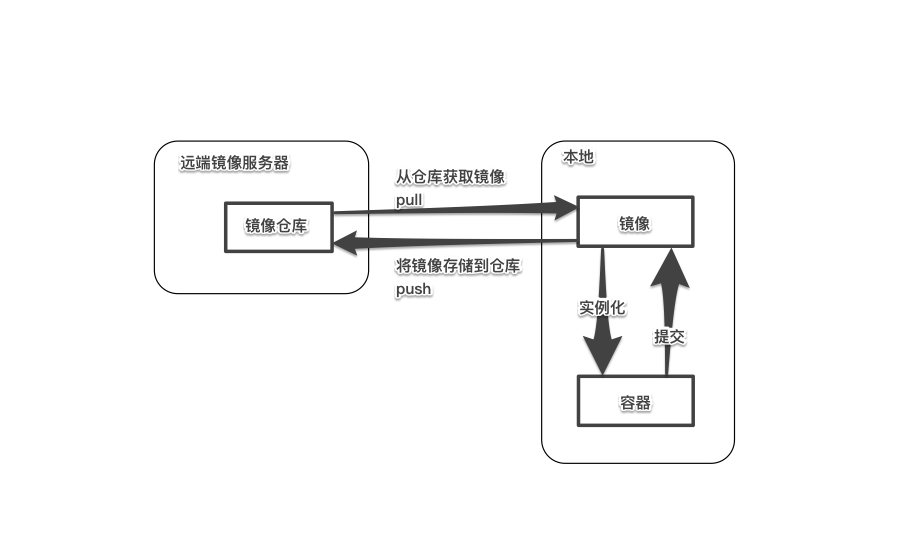
<p>这三部分组成了Docker的整个生命周期，如下图所示，容器是由镜像实例化而来的，这和我们学习的面向对象的概念十分相似，我们可以把镜像想象成类,把容器想象成类经过实例化后的对象，这样就非常好理解镜像和容器的关系了。</p>
<p><img src="http://test.ineutech.com/2016-12-14-blog-Docker.png" alt="Macdown logo"></p>
<h3 id="Docker镜像"><a href="#Docker镜像" class="headerlink" title="Docker镜像"></a>Docker镜像</h3><p>Docker的镜像概念类似于虚拟机里的镜像，是一个只读的模板，一个独立的文件系统，包括运行容器所需的数据，可以用来创建新的容器。<br>例如：一个镜像可以包含一个完整的 ubuntu 操作系统环境，里面仅安装了Mysql或用户需要的其它应用程序。</p>
<p>Docker的镜像实际上由一层一层的文件系统组成，这种层级的文件系统被称为UnionFS。镜像可以基于Dockerfile构建，Dockerfile是一个描述文件，里面包含若干条命令，每条命令都会对基础文件系统创建新的层次结构。</p>
<p>Docker 提供了一个很简单的机制来创建镜像或者更新现有的镜像，用户甚至可以直接从其他人那里下载一个已经做好的镜像来直接使用。</p>
<p><strong>注：镜像是只读的，可以理解为静态文件。</strong></p>
<h3 id="Docker容器"><a href="#Docker容器" class="headerlink" title="Docker容器"></a>Docker容器</h3><p>Docker 利用容器来运行应用。</p>
<p>Docker容器是由Docker镜像创建的运行实例。Docker容器类似虚拟机，可以支持的操作包括启动，停止，删除等。每个容器间是相互隔离的，容器中会运行特定的应用，包含特定应用的代码及所需的依赖文件。</p>
<p>可以把容器看做是一个简易版的 Linux 环境（包括root用户权限、进程空间、用户空间和网络空间等）和运行在其中的应用程序。</p>
<p><strong>注：相对于镜像来说容器是动态的，容器在启动的时候创建一层可写层作为最上层。</strong></p>
<h3 id="Docker仓库"><a href="#Docker仓库" class="headerlink" title="Docker仓库"></a>Docker仓库</h3><p>如果你使用过git和github就很容易理解Docker的仓库概念。Docker 仓库的概念跟Git 类似，注册服务器可以理解为 GitHub 这样的托管服务。</p>
<p>Docker 仓库是用来包含镜像的位置，Docker提供一个注册服务器（Register）来保存多个仓库，每个仓库又可以包含多个具备不同tag的镜像。Docker运行中使用的默认仓库是 Docker Hub 公共仓库。</p>
<p>仓库支持的操作类似git，当用户创建了自己的镜像之后就可以使用 push 命令将它上传到公有或者私有仓库，这样下次在另外一台机器上使用这个镜像时候，只需要从仓库上 pull 下来就可以。</p>
]]></content>
    
    <summary type="html">
    
      &lt;h3 id=&quot;Docker生命周期&quot;&gt;&lt;a href=&quot;#Docker生命周期&quot; class=&quot;headerlink&quot; title=&quot;Docker生命周期&quot;&gt;&lt;/a&gt;Docker生命周期&lt;/h3&gt;&lt;p&gt;Docker 包括三个基本概念:&lt;/p&gt;
&lt;ul&gt;
&lt;li&gt;镜像（Image
    
    </summary>
    
    
      <category term="Docker" scheme="http://thornvbear.tech/tags/Docker/"/>
    
  </entry>
  
  <entry>
    <title>移动APP服务端API设计应该考虑到的问题</title>
    <link href="http://thornvbear.tech/2016/12/07/%E7%A7%BB%E5%8A%A8APP%E6%9C%8D%E5%8A%A1%E7%AB%AFAPI%E8%AE%BE%E8%AE%A1%E5%BA%94%E8%AF%A5%E8%80%83%E8%99%91%E5%88%B0%E7%9A%84%E9%97%AE%E9%A2%98/"/>
    <id>http://thornvbear.tech/2016/12/07/移动APP服务端API设计应该考虑到的问题/</id>
    <published>2016-12-07T05:16:45.000Z</published>
    <updated>2016-12-07T15:08:17.000Z</updated>
    
    <content type="html"><![CDATA[<p>这貌似又回到了多年前的CS架构，那时候我们用VB、VC、Delphi在Windows平台上快速开发各种应用程序。<br>不同的是，如今的移动端APP基本上都是联网从服务器端获取各种数据，客户端只是一个简单的表现层的工具。</p>
<p>不仅仅是移动APP，包括面向服务的SOA架构，都需要制定一套统一、规范的接口，那么，做这样的后端接口需要注意哪些问题呢？</p>
<h3 id="1、跨平台性"><a href="#1、跨平台性" class="headerlink" title="1、跨平台性"></a>1、跨平台性</h3><p>所谓跨平台是指我们的接口要能够支持不同的终端，比如android、ios以及桌面软件、网站等，一套接口，支持多端，就像当年Java的口号一样“Write Once,Run Anywhere”。</p>
<p>当然从本质上讲，服务器端的接口跟终端是没有太大关系的，只是接口应该考虑到不同端的接入成本，采用通用的解决方案，比如通信协议就采用最常用的HTTP协议，如果是即时通信，可以采用开放的XMPP协议，做游戏的可以采用可靠的TCP协议，除非TCP不够用了，再采用定制的UDP协议。数据交换采用xml或者json格式等等。总之，要达到的目标就是让不同的端能够很方便的使用你的接口。</p>
<h3 id="2、良好的响应速度"><a href="#2、良好的响应速度" class="headerlink" title="2、良好的响应速度"></a>2、良好的响应速度</h3><p>如果要用一个指标来衡量接口的性能的话，那么我想最重要的就是响应速度了。接口应该以最快的速度将数据返回给请求者。</p>
<p>试想，当我们打开一个页面，如果“努力加载中”之类的提示超过三五秒钟的话，我们肯定会变得不耐烦，移动app本来大部分就是用户在碎片化时间来使用的，在有限的时间内，用户恨不得获得的信息越多越好，即使你的app界面设计的再好，用户也不会买账。</p>
<p>提高响应速度又是个老生常谈的问题，大体上应该按照以下步骤来做：</p>
<ul>
<li><p>初期，以功能为主，要保证功能完整，满足业务需求，这阶段可以使用动态的语言，比如java、php、asp.net等，配合设计良好的数据库结构和索引，能满足一定的需求；</p>
</li>
<li><p>其次，随着用户的增多，可以考虑一些缓存方案，缓存是解决性能问题的万金油，通常能起到立竿见影的效果。</p>
</li>
</ul>
<p>最常用的静态文件缓存，memcached内存缓存等。</p>
<p>然后，单台机器的吞吐率不行了，通过负载均衡多加几台机器就行了。七八台机器，支持每天千万级的接口调用是可行的。或者，直接采用CDN的解决方案，将绝大多数的静态资源交给CDN去处理。总之，要达到的目标就是快，一个页面，秒开最好，超过三秒就需要找找原因了。</p>
<h3 id="3、接口要为移动客户端考虑"><a href="#3、接口要为移动客户端考虑" class="headerlink" title="3、接口要为移动客户端考虑"></a>3、接口要为移动客户端考虑</h3><p>接口不仅仅是提供数据和功能就完事了，更应该充分考虑移动端的特性，为移动端提供更加方便、快捷的接口。</p>
<p>比如，在移动端里，下拉刷新和上拉加载更多是很常见的功能，如果接口仍然按照传统的web思路，只提供按页读取的话，就会造成移动端的额外的数据请求和计算。 这时，接口就应该针对这两种类型的操作提供额外的支持。</p>
<p>再比如，对于一个新闻阅读类的app来说，最新的新闻列表里的文章，特别是前几条，用户很容易点击进去看，而后面的老的文章列表，一来用户下滑加载好几页的情况较少，二来过时的新闻用户也很少点。如果，接口在返回新闻列表时，对于最新的列表，可以直接把文章的正文（或者部分正文，比如一屏的内容）信息一起传给客户端，这样，用户在打开新闻详情页的时候，就不用再从服务器端获取了，自然可以做到秒开。</p>
<p>比如访问第一页时，接口可以返回文章内容，如下所示 ，content=1表示加载文章内容newslist?page=1&amp;pagesize=20&amp;content=1其他页时，newslist?page=5&amp;pagesize=20&amp;content=0 ,不用加载文章内容。</p>
<p>当然，客户端要跟接口做好配合，搭配好，才能最大化的提高性能。比如，移动端都有左右滑动来看上一篇、下一篇文章或者图片的功能，如果，当用户请求某篇文章的时候，服务器端顺便也把下一篇文章的内容返回回来了，那么当用户看下一篇的时候，是不是就很快了呢。<br>当然这种preload的方案也不能滥用，如果预加载数据的命中率较低的话，也不行，白白浪费了很多的流量。</p>
<h3 id="4、考虑移动端的网络情况和耗电量"><a href="#4、考虑移动端的网络情况和耗电量" class="headerlink" title="4、考虑移动端的网络情况和耗电量"></a>4、考虑移动端的网络情况和耗电量</h3><p>如果让我们说出哪类app比较好，可能还不大好说，但是如果让我们说出哪些app很差，我们肯定会说出那些 体积很大、占用内存多、界面很卡、费电的app不好。</p>
<p>对于移动APP开发者来说， 网络流量和电池电量是不得不考虑的问题。</p>
<p>不过，您也许会说，这些跟接口没啥关系吧，服务器端的接口还能管得了客户端的网络流量和电量？</p>
<p>对于网络情况，接口应该具备为不同的网络提供不同的内容的能力，通常，移动端的上网方式无非是2G（GSM、GPRS、EDGE）、3G（CDMA、TDSCDMA、WCDMA）、WIFI，设想一下，如果用户在流量需要花钱的情况下，你的app给用户展示了视频、音频、大量的图片而没有通知用户的情况下，用户会怎么想，毕竟国内的流量费用还是很贵的。还以上面的新闻列表接口为例，如果我们能够知道用户的网络情况，只有在wifi的情况下才给用户传输封面图、缩略图之类的，是不是可以帮用户节省很多流量呢。<br>newslist?page=1&amp;pagesize=20&amp;content=1&amp;network=wifi</p>
<p>对于电量，首先我们要弄清楚，app的哪些方面会消耗电量？</p>
<p>比如app有大量的计算、有很炫的视觉画面都会消耗电量， 另外，不断的移动网络链接也会消耗大量的电量，我们都知道移动网络是通过无线电波来通讯的，那么发射装置就需要消耗一定的电量来发射和接收无线信号。特别的是，频繁的链接会不断的切换网络设备与移动基站之间连接状态，这都会消耗一部分电量。</p>
<p>所以，对于接口而言，尽量用少的链接传输多的数据，比如，对于关于我们、版本更新以及一些系统配置信息，完全可以通过一次链接全部返回给客户端。</p>
<h3 id="5、通用的数据交换格式"><a href="#5、通用的数据交换格式" class="headerlink" title="5、通用的数据交换格式"></a>5、通用的数据交换格式</h3><p>目前，对于接口和客户端的数据交换格式，基本上就是两种，xml和json，而现在使用json的应该占大多数。交换的数据包括两种，一种是客户端请求服务器端接口时传递的一些参数，一种是服务器端返回给客户端的数据。对于客户端的请求参数，现在也越来越多的接口要求采用json的格式，而不是以往最常见的key_value对了。比如，接口需要username和password两个参数key_value pair的方式是：username=hutuseng&amp;password=hutusengpwd然后通过GET或者POST方式传送。而通过json方式交换数据的话，格式如下，直接POST到服务器端。{‘username’:’hutuseng’,’password’:’hutusengpwd’}对于服务器端返回的json数据格式，</p>
<p>需要注意两个问题：一是汉字编码问题，因为json（javascript）内部支持Unicode编码，会将汉字等转换成unicode编码保存， 所以在返回结果中，对于中文，可以直接输出中文，也可以输出中文的unicode编码，json解析器都会很好的解析。</p>
<p>比如下面两种方式都是可以的。{“code”:”208”,”data”:”\u53c2\u6570\u4e0d\u5b8c\u6574”}</p>
<p>{“code”: “208”,”data”: “参数不完整”}</p>
<p>二是字段的数据类型，特别是数字类型的，json中尽量转成数字格式，比如{‘userid’:128}不要写成{‘userid’:’128’}</p>
<h3 id="6、接口统计功能"><a href="#6、接口统计功能" class="headerlink" title="6、接口统计功能"></a>6、接口统计功能</h3><p>在做PC端网站的时候，我们都会给我们的网站加上个统计功能，要么自己写统计系统，要么使用第三方的比如GA、百度等。移动端接口API则需要我们自己实现统计功能，这时就需要我们尽可能多的收集客户端的信息，除了传统的IP、User-Agent之外，还应该收集一些移动相关的信息，比如手机操作系统，是android还是ios，都是什么版本，用户使用的网络状况，是2G、3G、4G还是WIFI客户端APP是什么版本信息。这样，有助于我们更好的了解我们用户的使用情况。</p>
<h3 id="7、客户端与服务端的肥瘦平衡"><a href="#7、客户端与服务端的肥瘦平衡" class="headerlink" title="7、客户端与服务端的肥瘦平衡"></a>7、客户端与服务端的肥瘦平衡</h3><p>在以前C/S、B/S架构时，我们就已多次讨论过这个问题，客户端是瘦点好还是肥点好，当然也没有固定答案，需要自己根据实际情况去做权衡。但是，在移动开发中，由于客户端的修改会很费时费力，特别是IOS应用还要经过Apple审核，另外，当前IOS开发人员、Android开发人员的人工成本普遍较高，人才紧缺，基于这两点，能在服务器端实现的功能就不要放在客户端，毕竟服务器端程序的修改要比客户端方便、灵活、快捷的多。</p>
<h3 id="8、隐式用户与显式用户"><a href="#8、隐式用户与显式用户" class="headerlink" title="8、隐式用户与显式用户"></a>8、隐式用户与显式用户</h3><p>显式用户和隐式用户，我不知道这两个词用的是否确切。 显式用户指的是，APP程序中有用户系统，一个username、password正确的合法用户，称之为显式的用户，通常显式用户都需要注册，登录以后能完成一些个人相关的操作。隐式用户指的是，APP程序本身就没有用户系统，或者一个在没有登录的情况下，使用我们APP的用户。在这种情况下，可以通过客户端生成的UDID来标识一个用户。有了用户信息，我们就能够了解不同用户的使用习惯，而不仅仅是全体用户的一个整体的统计信息，有了这些个体的信息之后，就可以做一些用户分群、个性化推荐之类的事情。</p>
<h3 id="9、安全问题"><a href="#9、安全问题" class="headerlink" title="9、安全问题"></a>9、安全问题</h3><p>网络安全已经从桌面互联网转到了移动互联网，从客户端蔓延到了接口API中。传统固若金汤的网站，很可能因为接口的一点疏忽而遭受入侵。现在，在很多白帽子或者黑客的入侵思路中，先看看移动端接口是否存在漏洞，再看网站是否有漏洞。</p>
<p>客户端APP与接口的通信很容易被得到，只要在中间路由上嗅探一下就行，whireshark、tcpdump这类工具使得这项工作变得简单无比。</p>
<p>所以，接口的安全工作不能马虎，暴力破解啊、SQL Injection啊、伪造请求和数据啊、重复提交啊也要考虑到,如果数据特别敏感，可以考虑采用SSL/TLS等加密传输，或者客户端、服务器端约定一个加密算法和密钥，对来往传输的数据进行加密、解密如果不采用RESTful API，可以采用基于WSDL和SOAP的Web Service的安全措施。</p>
<h3 id="10、良好的接口说明文档和测试程序"><a href="#10、良好的接口说明文档和测试程序" class="headerlink" title="10、良好的接口说明文档和测试程序"></a>10、良好的接口说明文档和测试程序</h3><p>接口文档有时候是项目初期就定下来的，前后端开发人员按照接口规范开发，有的是接口开发完成后写的。接口文档要清晰、明了，包含多少个接口，每个接口的地址、参数、请求方式、数据交换格式、返回值等都要写清楚。接口测试程序，有条件的话，也可以提供，方便前后端的调试。</p>
<h3 id="11、版本的维护"><a href="#11、版本的维护" class="headerlink" title="11、版本的维护"></a>11、版本的维护</h3><p>随着业务的变化，客户端APP和服务器端API都会发生变化，增加新的功能，修改已有的功能，增加功能还好说， 如果是接口需要修改，那么就面临着同一个接口要同时为不同版本的客户端服务的问题。因此，服务器端接口也要做好相应的版本维护。</p>
]]></content>
    
    <summary type="html">
    
      &lt;p&gt;这貌似又回到了多年前的CS架构，那时候我们用VB、VC、Delphi在Windows平台上快速开发各种应用程序。&lt;br&gt;不同的是，如今的移动端APP基本上都是联网从服务器端获取各种数据，客户端只是一个简单的表现层的工具。&lt;/p&gt;
&lt;p&gt;不仅仅是移动APP，包括面向服务的SO
    
    </summary>
    
    
      <category term="杂谈" scheme="http://thornvbear.tech/tags/%E6%9D%82%E8%B0%88/"/>
    
  </entry>
  
  <entry>
    <title>移动端开发要懂点网络通信！</title>
    <link href="http://thornvbear.tech/2016/11/25/%E7%A7%BB%E5%8A%A8%E7%AB%AF%E5%BC%80%E5%8F%91%E8%A6%81%E6%87%82%E7%82%B9%E7%BD%91%E7%BB%9C%E9%80%9A%E4%BF%A1/"/>
    <id>http://thornvbear.tech/2016/11/25/移动端开发要懂点网络通信/</id>
    <published>2016-11-25T06:26:22.000Z</published>
    <updated>2016-12-02T06:38:29.000Z</updated>
    
    <content type="html"><![CDATA[<h3 id="TCP协议与UDP协议的区别"><a href="#TCP协议与UDP协议的区别" class="headerlink" title="TCP协议与UDP协议的区别"></a>TCP协议与UDP协议的区别</h3><p>首先咱们弄清楚，TCP协议和UCP协议与TCP/IP协议的联系，很多人犯糊涂了，一直都是说TCP/IP协议与UDP协议的区别，我觉得这是没有从本质上弄清楚网络通信！<br>TCP/IP协议是一个协议簇。里面包括很多协议的。UDP只是其中的一个。之所以命名为TCP/IP协议，因为TCP,IP协议是两个很重要的协议，就用他两命名了。<br>TCP/IP协议集包括应用层,传输层，网络层，网络访问层。<br>其中应用层包括:</p>
<ul>
<li>超文本传输协议(HTTP):万维网的基本协议.   </li>
<li>文件传输(TFTP简单文件传输协议):   </li>
<li>远程登录(Telnet),提供远程访问其它主机功能,它允许用户登录     </li>
<li>internet主机,并在这台主机上执行命令.    </li>
<li>网络管理(SNMP简单网络管理协议),该协议提供了监控网络设备的方法,以及配置管理,统计信息收集,性能管理及安全管理等.   </li>
<li>域名系统(DNS),该系统用于在internet中将域名及其公共广播的网络节点转换成IP地址. </li>
<li>其次网络层包括: <ul>
<li>Internet协议(IP)     </li>
<li>Internet控制信息协议(ICMP)    </li>
<li>地址解析协议(ARP)    </li>
<li>反向地址解析协议(RARP)  </li>
</ul>
</li>
</ul>
<p>最后说网络访问层:网络访问层又称作主机到网络层(host-to-network).网络访问层的功能包括IP地址与物理地址硬件的映射,以及将IP封装成帧.基于不同硬件类型的网络接口,网络访问层定义了和物理介质的连接.<br>当然我这里说得不够完善，TCP/IP协议本来就是一门学问，每一个分支都是一个很复杂的流程，但我相信每位学习软件开发的同学都有必要去仔细了解一番。</p>
<h3 id="TCP（Transmission-Control-Protocol，传输控制协议）"><a href="#TCP（Transmission-Control-Protocol，传输控制协议）" class="headerlink" title="TCP（Transmission Control Protocol，传输控制协议）"></a>TCP（Transmission Control Protocol，传输控制协议）</h3><p>TCP（Transmission Control Protocol，传输控制协议）是面向连接的协议，也就是说，在收发数据前，必须和对方建立可靠的连接。一个TCP连接必须要经过三次“对话”才能建立起来，其中的过程非常复杂，只简单的描述下这三次对话的简单过程：主机A向主机B发出连接请求数据包：“我想给你发数据，可以吗？”，这是第一次对话；主机B向主机A发送同意连接和要求同步（同步就是两台主机一个在发送，一个在接收，协调工作）的数据包：“可以，你什么时候发？”，这是第二次对话；主机A再发出一个数据包确认主机B的要求同步：“我现在就发，你接着吧！”，这是第三次对话。三次“对话”的目的是使数据包的发送和接收同步，经过三次“对话”之后，主机A才向主机B正式发送数据。<br>详细点说就是：（文章部分转载<a href="http://zhangjiangxing-gmail-com.iteye.com，主要是这个人讲解得很到位，的确很容易使人理解！）" target="_blank" rel="external">http://zhangjiangxing-gmail-com.iteye.com，主要是这个人讲解得很到位，的确很容易使人理解！）</a></p>
<h3 id="TCP三次握手过程"><a href="#TCP三次握手过程" class="headerlink" title="TCP三次握手过程"></a>TCP三次握手过程</h3><ul>
<li>1 主机A通过向主机B 发送一个含有同步序列号的标志位的数据段给主机B ,向主机B 请求建立连接,通过这个数据段,<br>主机A告诉主机B 两件事:我想要和你通信;你可以用哪个序列号作为起始数据段来回应我.</li>
<li>2 主机B 收到主机A的请求后,用一个带有确认应答(ACK)和同步序列号(SYN)标志位的数据段响应主机A,也告诉主机A两件事:<br>我已经收到你的请求了,你可以传输数据了;你要用哪佧序列号作为起始数据段来回应我</li>
<li>3 主机A收到这个数据段后,再发送一个确认应答,确认已收到主机B 的数据段:”我已收到回复,我现在要开始传输实际数据了<br>这样3次握手就完成了,主机A和主机B 就可以传输数据了.</li>
</ul>
<p>3次握手的特点<br>没有应用层的数据<br>SYN这个标志位只有在TCP建产连接时才会被置1<br>握手完成后SYN标志位被置0</p>
<h3 id="TCP建立连接要进行3次握手-而断开连接要进行4次"><a href="#TCP建立连接要进行3次握手-而断开连接要进行4次" class="headerlink" title="TCP建立连接要进行3次握手,而断开连接要进行4次"></a>TCP建立连接要进行3次握手,而断开连接要进行4次</h3><ul>
<li>1 当主机A完成数据传输后,将控制位FIN置1,提出停止TCP连接的请求</li>
<li>2  主机B收到FIN后对其作出响应,确认这一方向上的TCP连接将关闭,将ACK置1</li>
<li>3 由B 端再提出反方向的关闭请求,将FIN置1</li>
<li>4 主机A对主机B的请求进行确认,将ACK置1,双方向的关闭结束.<br>由TCP的三次握手和四次断开可以看出,TCP使用面向连接的通信方式,大大提高了数据通信的可靠性,使发送数据端和接收端在数据正式传输前就有了交互,为数据正式传输打下了可靠的基础</li>
</ul>
<h3 id="名词解释"><a href="#名词解释" class="headerlink" title="名词解释"></a>名词解释</h3><ul>
<li>ACK  TCP报头的控制位之一,对数据进行确认.确认由目的端发出,用它来告诉发送端这个序列号之前的数据段都收到了.比如,确认号为X,则表示前X-1个数据段都收到了,只有当ACK=1时,确认号才有效,当ACK=0时,确认号无效,这时会要求重传数据,保证数据的完整性.</li>
<li>SYN  同步序列号,TCP建立连接时将这个位置1</li>
<li>FIN  发送端完成发送任务位,当TCP完成数据传输需要断开时,提出断开连接的一方将这位置1</li>
</ul>
<h3 id="TCP的包头结构："><a href="#TCP的包头结构：" class="headerlink" title="TCP的包头结构："></a>TCP的包头结构：</h3><ul>
<li>源端口 16位</li>
<li>目标端口 16位</li>
<li>序列号 32位</li>
<li>回应序号 32位</li>
<li>TCP头长度 4位</li>
<li>reserved 6位</li>
<li>控制代码 6位</li>
<li>窗口大小 16位</li>
<li>偏移量 16位</li>
<li>校验和 16位</li>
<li>选项  32位(可选)</li>
</ul>
<p>这样我们得出了TCP包头的最小长度，为20字节。</p>
<h3 id="UDP（User-Data-Protocol，用户数据报协议）"><a href="#UDP（User-Data-Protocol，用户数据报协议）" class="headerlink" title="UDP（User Data Protocol，用户数据报协议）"></a>UDP（User Data Protocol，用户数据报协议）</h3><ul>
<li>（1） UDP是一个非连接的协议，传输数据之前源端和终端不建立连接，当它想传送时就简单地去抓取来自应用程序的数据，并尽可能快地把它扔到网络上。在发送端，UDP传送数据的速度仅仅是受应用程序生成数据的速度、计算机的能力和传输带宽的限制；在接收端，UDP把每个消息段放在队列中，应用程序每次从队列中读一个消息段。</li>
<li>（2） 由于传输数据不建立连接，因此也就不需要维护连接状态，包括收发状态等，因此一台服务机可同时向多个客户机传输相同的消息。</li>
<li>（3） UDP信息包的标题很短，只有8个字节，相对于TCP的20个字节信息包的额外开销很小。</li>
<li>（4） 吞吐量不受拥挤控制算法的调节，只受应用软件生成数据的速率、传输带宽、源端和终端主机性能的限制。</li>
<li>（5）UDP使用尽最大努力交付，即不保证可靠交付，因此主机不需要维持复杂的链接状态表（这里面有许多参数）。</li>
<li>（6）UDP是面向报文的。发送方的UDP对应用程序交下来的报文，在添加首部后就向下交付给IP层。既不拆分，也不合并，而是保留这些报文的边界，因此，应用程序需要选择合适的报文大小。</li>
</ul>
<p>我们经常使用“ping”命令来测试两台主机之间TCP/IP通信是否正常，其实“ping”命令的原理就是向对方主机发送UDP数据包，然后对方主机确认收到数据包，如果数据包是否到达的消息及时反馈回来，那么网络就是通的。</p>
<h3 id="UDP的包头结构："><a href="#UDP的包头结构：" class="headerlink" title="UDP的包头结构："></a>UDP的包头结构：</h3><ul>
<li>源端口 16位</li>
<li>目的端口 16位</li>
<li>长度 16位</li>
<li>校验和 16位</li>
</ul>
<h3 id="小结TCP与UDP的区别："><a href="#小结TCP与UDP的区别：" class="headerlink" title="小结TCP与UDP的区别："></a>小结TCP与UDP的区别：</h3><ul>
<li>1.基于连接与无连接；</li>
<li>2.对系统资源的要求（TCP较多，UDP少）；</li>
<li>3.UDP程序结构较简单；</li>
<li>4.流模式与数据报模式 ；</li>
<li>5.TCP保证数据正确性，UDP可能丢包，TCP保证数据顺序，UDP不保证。</li>
</ul>
]]></content>
    
    <summary type="html">
    
      &lt;h3 id=&quot;TCP协议与UDP协议的区别&quot;&gt;&lt;a href=&quot;#TCP协议与UDP协议的区别&quot; class=&quot;headerlink&quot; title=&quot;TCP协议与UDP协议的区别&quot;&gt;&lt;/a&gt;TCP协议与UDP协议的区别&lt;/h3&gt;&lt;p&gt;首先咱们弄清楚，TCP协议和UCP协议与TC
    
    </summary>
    
    
      <category term="网络通信" scheme="http://thornvbear.tech/tags/%E7%BD%91%E7%BB%9C%E9%80%9A%E4%BF%A1/"/>
    
  </entry>
  
  <entry>
    <title>PHP 笔记整理（二）</title>
    <link href="http://thornvbear.tech/2016/10/22/PHP%20%E7%AC%94%E8%AE%B0%E6%95%B4%E7%90%86%EF%BC%88%E4%BA%8C%EF%BC%89/"/>
    <id>http://thornvbear.tech/2016/10/22/PHP 笔记整理（二）/</id>
    <published>2016-10-22T05:42:13.000Z</published>
    <updated>2016-11-16T05:22:22.000Z</updated>
    
    <content type="html"><![CDATA[<h1 id="php常用开发库"><a href="#php常用开发库" class="headerlink" title="php常用开发库"></a>php常用开发库</h1><h2 id="图表库"><a href="#图表库" class="headerlink" title="图表库"></a>图表库</h2><p>下面的类库可以让你很简单就能创建复杂的图表和图片。当然，它们需要GD库的支持。</p>
<ul>
<li><a href="http://pchart.sourceforge.net/" target="_blank" rel="external"><strong>pChart</strong></a> - 一个可以创建统计图的库。</li>
<li><a href="https://naku.dohcrew.com/libchart/pages/introduction/" target="_blank" rel="external"><strong>Libchart</strong></a> - 这也是一个简单的统计图库。</li>
<li><a href="http://www.aditus.nu/jpgraph/" target="_blank" rel="external"><strong>JpGraph</strong></a> - 一个面向对象的图片创建类。 </li>
<li><a href="http://teethgrinder.co.uk/open-flash-chart/" target="_blank" rel="external"><strong>Open Flash Chart</strong></a> - 这是一个基于Flash的统计图。</li>
</ul>
<h2 id="RSS-解析"><a href="#RSS-解析" class="headerlink" title="RSS 解析"></a>RSS 解析</h2><p>解释<mark>RSS</mark>并是一件很单调的事情，不过幸好你有下面的类库可以帮助你方便地读取RSS的Feed。</p>
<ul>
<li><a href="http://magpierss.sourceforge.net/" target="_blank" rel="external"><strong>MagpieRSS</strong></a> - 开源的PHP版RSS解析器，据说功能强大，未验证。</li>
<li><a href="http://simplepie.org/" target="_blank" rel="external"><strong>SimplePie</strong></a> - 这是一个非常快速，而且易用的RSS和Atom 解析库。</li>
</ul>
<h2 id="缩略图生成"><a href="#缩略图生成" class="headerlink" title="缩略图生成"></a>缩略图生成</h2><ul>
<li><a href="http://phpthumb.sourceforge.net/" target="_blank" rel="external"><strong>phpThumb</strong></a> - 功能很强大，如何强大还是自己去体会吧。</li>
</ul>
<h2 id="支付"><a href="#支付" class="headerlink" title="支付"></a>支付</h2><p>你的网站需要处理支付方面的事情？需要一个和支付网关的程序？下面这个程序可以帮到你。</p>
<ul>
<li><a href="http://phpfour.com/php-payment-gateway-library-for-paypal-authorizenet-and-2checkout/" target="_blank" rel="external"><strong>PHP Payment Library</strong></a> - 支持Paypal, Authorize.net 和2Checkout (2CO)</li>
</ul>
<h2 id="OpenID"><a href="#OpenID" class="headerlink" title="OpenID"></a>OpenID</h2><ul>
<li><a href="http://www.openidenabled.com/php-openid/" target="_blank" rel="external"><strong>PHP-OpenID</strong></a> - 支持OpenID的一个PHP库。OpenID是帮助你使用相同的用户名和口令登录不同的网站的一种解决方案。如果你对OpenID不熟悉的话，你可以到这里看看：<a href="http://openid.net.cn/" target="_blank" rel="external">http://openid.net.cn/</a></li>
</ul>
<h2 id="数据为抽象-对象关系映射ORM"><a href="#数据为抽象-对象关系映射ORM" class="headerlink" title="数据为抽象/对象关系映射ORM"></a>数据为抽象/对象关系映射ORM</h2><ul>
<li><a href="http://adodb.sourceforge.net/" target="_blank" rel="external"><strong>ADOdb</strong></a> - 数据库抽象</li>
<li><a href="http://www.doctrine-project.org/" target="_blank" rel="external"><strong>Doctrine</strong></a> - 对象关系映射 <code>Object relational mapper (ORM)</code>，需要 <code>PHP 5.2.3+</code> 版本，一个非常强大的<code>database abstraction layer (DBAL)</code>.</li>
<li><a href="http://propel.phpdb.org/trac/" target="_blank" rel="external"><strong>Propel</strong></a> - 对象关系映射框架- PHP5</li>
<li><a href="http://outlet-orm.org/" target="_blank" rel="external"><strong>Outlet</strong></a> - 也是关于对象关系映射的一个工具。</li>
</ul>
<p>注： 对象关系映射（Object Relational Mapping，简称ORM）是一种为了解决面向对象与关系数据库存在的互不匹配的现象的技术。简单的说，ORM是通过使用描述对象和数据库之间映射的元数据，将程序中的对象自动持久化到关系数据库中。本质上就是将数据从一种形式转换到另外一种形式。这也同时暗示者额外的执行开销；然而，如果ORM作为一 种中间件实现，则会有很多机会做优化，而这些在手写的持久层并不存在。更重要的是用于控制转换的元数据需要提供和管理；但是同样，这些花费要比维护手写的方案要少；而且就算是遵守ODMG规范的对象数据库依然需要类级别的元数据。</p>
<h2 id="PDF-生成器"><a href="#PDF-生成器" class="headerlink" title="PDF 生成器"></a>PDF 生成器</h2><ul>
<li><a href="http://www.fpdf.org/" target="_blank" rel="external"><strong>FPDF</strong></a> - 这量一个可以让你生成PDF的纯PHP类库。</li>
</ul>
<h2 id="Excel-相关"><a href="#Excel-相关" class="headerlink" title="Excel 相关"></a>Excel 相关</h2><p>你的站点需要生成 Excel？没有问题，下面这两个类库可以让你轻松做到这一点。</p>
<ul>
<li><a href="http://code.google.com/p/php-excel/" target="_blank" rel="external"><strong>php-excel</strong></a> - 这是一个非常简单的Excel文件生成类。</li>
<li><a href="http://code.google.com/p/php-excel-reader/" target="_blank" rel="external"><strong>PHP Excel Reader</strong></a> - 可以解析并读取XLS文件中的数据。</li>
</ul>
<h2 id="E-Mail-相关"><a href="#E-Mail-相关" class="headerlink" title="E-Mail 相关"></a>E-Mail 相关</h2><p>不喜欢PHP的mail函数？觉得不够强大？下面的PHP邮件相关的库绝对不会让你失望。</p>
<ul>
<li><a href="http://swiftmailer.org/" target="_blank" rel="external"><strong>Swift Mailer</strong></a> - 免费的超多功能的PHP邮件库。</li>
<li><a href="http://phpmailer.codeworxtech.com/" target="_blank" rel="external"><strong>PHPMailer</strong></a> - 超强大的邮件发送类。</li>
</ul>
<h2 id="单元测试"><a href="#单元测试" class="headerlink" title="单元测试"></a>单元测试</h2><p>如果你在使用测试驱动的方法开发你的程序，下面的类库和框架绝你能帮助你的开发。</p>
<ul>
<li><a href="http://www.simpletest.org/" target="_blank" rel="external"><strong>SimpleTest</strong></a> - 一个PHP的单元测试和网页测试的框架。</li>
<li><a href="http://www.phpunit.de/" target="_blank" rel="external"><strong>PHPUnit</strong></a> - 来自xUnit 家族，提供一个框架可以让你方便地进行单元测试的案例开发。并可非常容易地分析其测试结果。</li>
</ul>
<h2 id="PHP-Markdown-解析器"><a href="#PHP-Markdown-解析器" class="headerlink" title="PHP Markdown 解析器"></a>PHP Markdown 解析器</h2><ul>
<li><a href="https://github.com/thephpleague/commonmark" target="_blank" rel="external"><strong>CommonMark</strong></a> - 是基于 CommonMark 规范的 PHP Markdown 解析器。</li>
</ul>
<h1 id="响应式网站的最佳PHP框架"><a href="#响应式网站的最佳PHP框架" class="headerlink" title="响应式网站的最佳PHP框架"></a>响应式网站的最佳PHP框架</h1><p>目前，网上有大量的框架供大家选择，本文分享9款各方面都兼具优势的PHP框架，主要用来构建响应式网站。</p>
<h2 id="Symfony"><a href="#Symfony" class="headerlink" title="Symfony"></a>Symfony</h2><p><a href="https://github.com/symfony" target="_blank" rel="external"><strong>Symfony</strong></a> - 一个开源的PHP框架，它在速度和灵活性方面都兼具优势。它提供了一套解决特定工程问题的概念和工具，帮助广大开发者减少重复性工作。抽象化意味着能用更简洁的东西表达复杂的概念、流程等。</p>
<h2 id="Phalcon"><a href="#Phalcon" class="headerlink" title="Phalcon"></a>Phalcon</h2><p>如果你想提高网站速度，你可以试试<a href="https://phalconphp.com/en/" target="_blank" rel="external"><strong>Phalcon</strong></a>框架。基于C语言开发，也是目前市场上最快的一款PHP框架。 开发者不需要学习和使用C语言功能， 因为所有功能都以PHP类的方式暴露出来，可以直接使用。Phalcon也是松耦合的，可以根据项目的需要任意使用其它对象。</p>
<h2 id="Laravel"><a href="#Laravel" class="headerlink" title="Laravel"></a>Laravel</h2><p><a href="https://github.com/laravel/laravel" target="_blank" rel="external"><strong>Laravel</strong></a> - 2016年最流行的PHP框架，也是最容易学习的开发框架，开发者只需一个脚本就可以实现一个网站功能。它最强大的特征是具有一个个性化的模板引擎，称作“Blade”，并且在网站上无任何性能开销。</p>
<h2 id="Yii"><a href="#Yii" class="headerlink" title="Yii"></a>Yii</h2><p><a href="http://www.yiiframework.com/" target="_blank" rel="external"><strong>Yii</strong></a> - 一个基于组件、用于开发大型Web应用的高性能PHP框架。Yii几乎提供了今日Web 2.0应用开发所需要的一切功能。Yii是最有效率的PHP框架之一。Yii里面的Gii是一个功能强大的代码生成器，基于网络，开发者使用它可以轻易地生成表单、模块、CRUD、模型等。</p>
<h2 id="CodeIgniter"><a href="#CodeIgniter" class="headerlink" title="CodeIgniter"></a>CodeIgniter</h2><p><a href="http://www.codeigniter.com/" target="_blank" rel="external"><strong>Codeigniter</strong></a> - 一个非常简单且功能全面的Web开发构建包，其体积只有2MB。它提供一套丰富的标准库以及简单的接口和逻辑结构，其目的是使开发人员更快速地进行项目开发。使用CodeIgniter可以减少代码编写量，并将你的精力投入到项目的创造性开发上。</p>
<h2 id="Cake"><a href="#Cake" class="headerlink" title="Cake"></a>Cake</h2><p><a href="https://cakephp.org/" target="_blank" rel="external"><strong>Cake</strong></a> - 一款非常适合商业网站开发的PHP框架，因缺乏YAML或XML文件，所以它无需配置。它提供程序员所需要的基本体系架构，因此程序员可以使用它更快速且不失灵活性地创建网络应用程序。而这就是我们创造CakePHP的首要目的。</p>
<p>CakePHP拥有一个活跃的开发团队和社区，使CakePHP本身更具备应有的价值。另外，使用CakePHP也意味着您的应用程序将更容易测试，也更容易被改良、更新。</p>
<h2 id="ZendPHP"><a href="#ZendPHP" class="headerlink" title="ZendPHP"></a>ZendPHP</h2><p><a href="https://framework.zend.com/" target="_blank" rel="external"><strong>ZendPHP</strong></a> - 已经被各大网站采用，比如BBC、BNP Paribas或Cisco WebEx，所以你可以放心使用该框架。</p>
<p>ZendPHP使用MVC三层架构，并且是一个完全面向对象的框架。组件非常丰富，且组件之间耦合很松散。简单说就是，各组件之间的依赖性非常低，基本上每个组件都可以单独拿出来使用。</p>
<h2 id="FuelPHP"><a href="#FuelPHP" class="headerlink" title="FuelPHP"></a>FuelPHP</h2><p><a href="https://github.com/fuel/fuel" target="_blank" rel="external"><strong>FuelPHP</strong></a> - 一个简单、灵活的PHP 5.3 Web框架，其思路结合了来自主流框架的优点。它也是一个MVC框架，并且支持HMVC。</p>
<h2 id="Slim"><a href="#Slim" class="headerlink" title="Slim"></a>Slim</h2><p><a href="http://www.slimframework.com/" target="_blank" rel="external"><strong>Slim</strong></a> - 一个非常轻量和微小的PHP框架，尽管如此，开发者仍然可以开发出非常强大的Web站点。它具有流线型的路由器、自定义视图呈现的模板渲染功能、安全cookies、flash消息和一个简单的配置过程、HTTP缓存、错误处理等。</p>
<p><strong>未完，继续中。。。</strong></p>
]]></content>
    
    <summary type="html">
    
      &lt;h1 id=&quot;php常用开发库&quot;&gt;&lt;a href=&quot;#php常用开发库&quot; class=&quot;headerlink&quot; title=&quot;php常用开发库&quot;&gt;&lt;/a&gt;php常用开发库&lt;/h1&gt;&lt;h2 id=&quot;图表库&quot;&gt;&lt;a href=&quot;#图表库&quot; class=&quot;headerlink&quot; ti
    
    </summary>
    
    
      <category term="php" scheme="http://thornvbear.tech/tags/php/"/>
    
  </entry>
  
  <entry>
    <title>Xcode 8.0姗姗来迟</title>
    <link href="http://thornvbear.tech/2016/09/14/xcode8%E5%A7%97%E5%A7%97%E6%9D%A5%E8%BF%9F/"/>
    <id>http://thornvbear.tech/2016/09/14/xcode8姗姗来迟/</id>
    <published>2016-09-14T09:46:36.000Z</published>
    <updated>2018-11-21T09:51:57.405Z</updated>
    
    <content type="html"><![CDATA[<h2 id="Xcode-8-0-版本"><a href="#Xcode-8-0-版本" class="headerlink" title="Xcode 8.0 版本"></a>Xcode 8.0 版本</h2><ul>
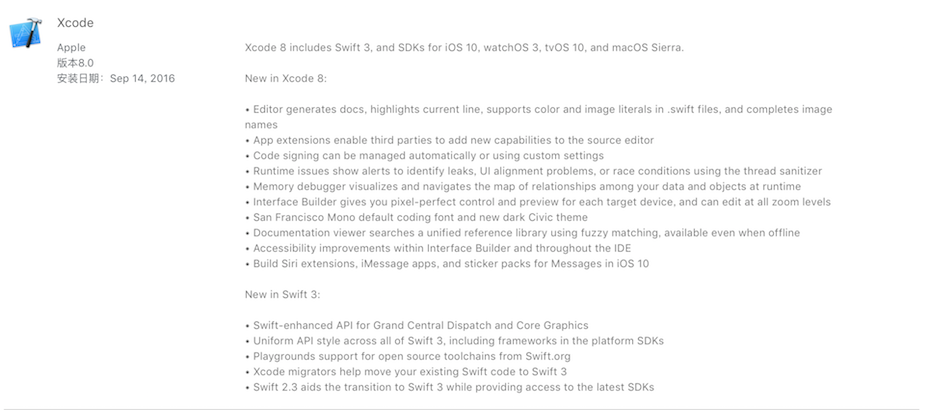
<li>Xcode 8.0GM版本已发布了一段时间，用于新一代的Xcode升级版本，这里普及一个知识：什么是GM版本，GM版是软件开发版本中的最终正式版的母版，不意外发现重大bug的话，GM版＝正式x.0版。Xcode 8.0正式版也于前两天正式发布，显然它是为iOS 10而生的。</li>
<li>Xcode 8.0更新提示：</li>
</ul>
<p><img src="http://test.ineutech.com/2016-09-17xcode8.0_update_note.png" alt="Smaller image"></p>
<ul>
<li><p>首先，Xcode 8引入了Swift3.0，加入了更多新的特性，加入了支持iOS 10、watchOS 3、tvOS 10、macOS Sierra的SDK。<br>至于详细的Release Note可以查看<a href="https://developer.apple.com/library/content/releasenotes/DeveloperTools/RN-Xcode/Introduction.html" target="_blank" rel="external">https://developer.apple.com/library/content/releasenotes/DeveloperTools/RN-Xcode/Introduction.html</a></p>
</li>
<li><p>这里也没什么有用的信息，Xcode性能提升，能更好的支持XIB，增加了一些性能提示，更便于开发者进行工作开发，新加入了San Francisco Mono 编辑字体和新的主题，值得一说的是：</p>
<h2 id="证书管理"><a href="#证书管理" class="headerlink" title="证书管理"></a>证书管理</h2><p>  Xcode支持自动管理证书的功能，当然也可以自己设置。<br>  <img src="https://dn-thornstep.qbox.me/2016-09-17_sign_manage_intro.png" alt="Mou image"><br>  不过建议大家勾选这个Automatically manage signing.可以很方便的为我们管理自己的证书。</p>
<h2 id="xib或者storyboard"><a href="#xib或者storyboard" class="headerlink" title="xib或者storyboard"></a>xib或者storyboard</h2></li>
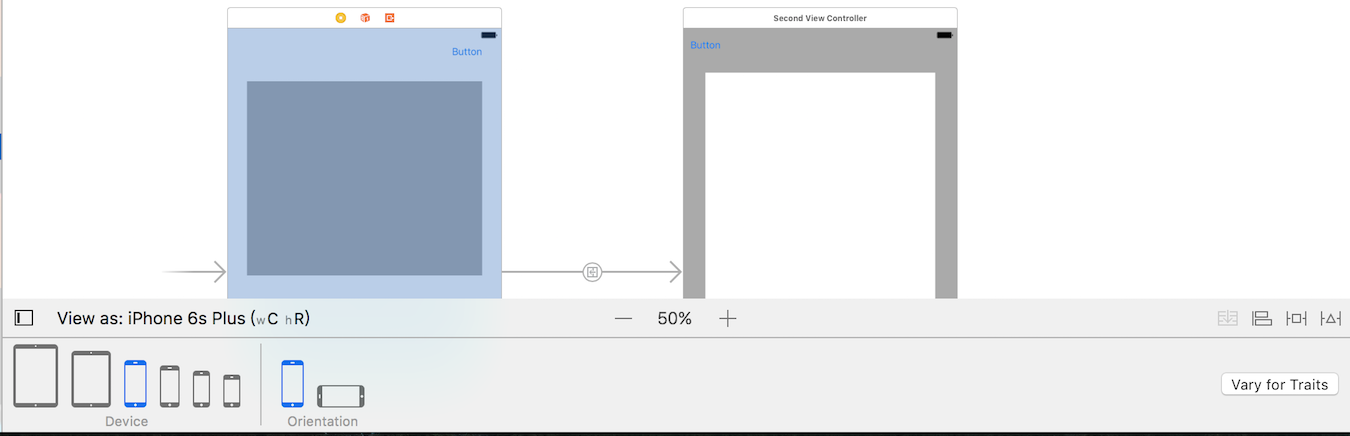
<li><p>1.xib可以更方便的查看你的布局在不同尺寸设备上的显示情况了。</p>
<p>  <img src="http://test.ineutech.com/2016-09-17_xib_diff_device.png" alt="image"><br>  可以看到Xcode8.0把设备尺寸设置放在了布局的最下方，而右边里的Attributes Inspector里的尺寸选择取消了，并且我们可以按条件选择要查看的设备，点击<code>vary for traits</code>可以选择width或者height查看。这次可以说苹果很有良心，为这个设计点赞。</p>
</li>
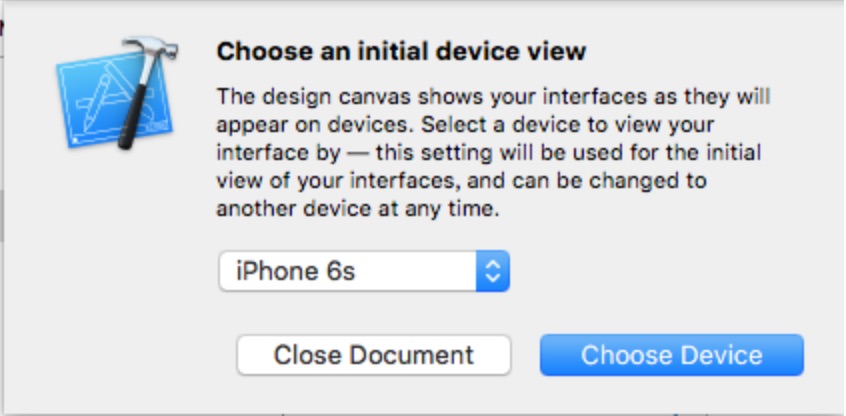
<li><p>2.使用Xcode8打开xib文件后，会出现下图的提示。<br>  <img src="http://test.ineutech.com/2016-09-17_xib_change_for_device.jpg" alt="image"></p>
<p>  大家选择Choose Device即可。之后大家会发现布局啊，frame乱了，只需要更新一下frame即可。</p>
<ul>
<li>注意：如果按上面的步骤操作后，在用Xcode7打开Xib会报一下错误</li>
<li><p>解决方法：需要删除xib里的</p>
<figure class="highlight plain"><table><tr><td class="gutter"><pre><div class="line">1</div></pre></td><td class="code"><pre><div class="line">&lt;capability name=&quot;documents saved in the Xcode 8 format&quot; minToolsVersion=&quot;8.0&quot;/&gt;</div></pre></td></tr></table></figure>
</li>
<li><p>以及把&lt; document &gt;中的toolsVersion和&lt; plugIn &gt;中的version改成你正常的xib文件中的值。</p>
</li>
</ul>
</li>
</ul>
<h2 id="代码注释不能用的解决办法"><a href="#代码注释不能用的解决办法" class="headerlink" title="代码注释不能用的解决办法"></a>代码注释不能用的解决办法</h2><ul>
<li><p>这个是因为苹果解决xcode ghost，把插件屏蔽了。</p>
<p>  解决方法</p>
<p>  打开终端，命令运行： sudo /usr/libexec/xpccachectl</p>
<p>  然后必须重启电脑后生效</p>
<p>  Xcode 8.0貌似取消了对插件的支持，因为苹果认为这会带来安全上的问题，并且提交审核会被拒绝，如果大家有什么新的解决办法请回复里告知，如果你对插件依赖性非常严重那么，可以参照<a href="http://vongloo.me/2016/09/10/Make-Your-Xcode8-Great-Again/?utm_source=tuicool&amp;utm_medium=referral&amp;sukey=3997c0719f15    15204f9d2fb0e66acbbbaaa5fd0d4849a108d51f0c9a0cdca5c0a61b68edc24f2f9423a81b60ce6e728c" target="_blank" rel="external">让你的 Xcode8 继续使用插件</a>。</p>
</li>
</ul>
<h2 id="iOS-10隐私权限设置"><a href="#iOS-10隐私权限设置" class="headerlink" title="iOS 10隐私权限设置"></a>iOS 10隐私权限设置</h2><ul>
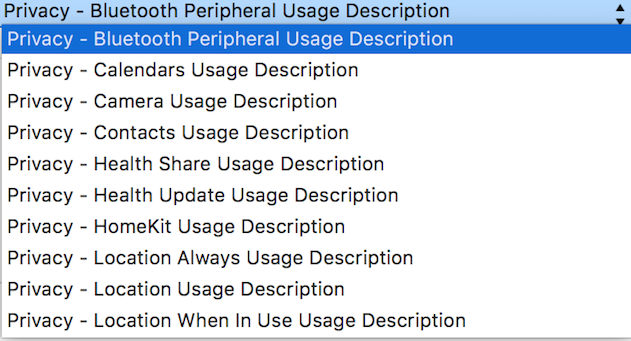
<li>iOS 10 开始对隐私权限更加严格，如果你不设置就会直接崩溃，现在很多遇到崩溃问题了，一般解决办法都是在info.plist文件添加对应的Key-Value就可以了。</li>
</ul>
<p><img src="http://test.ineutech.com/2016-09-17_ios10_private_setting.png" alt="image"><br>如上图显示的是部分权限设置：蓝牙使用权限，日历，相机，通讯录，健康分享，健康更新，后台一直定位，定位许可，使用时定位等权限设置。</p>
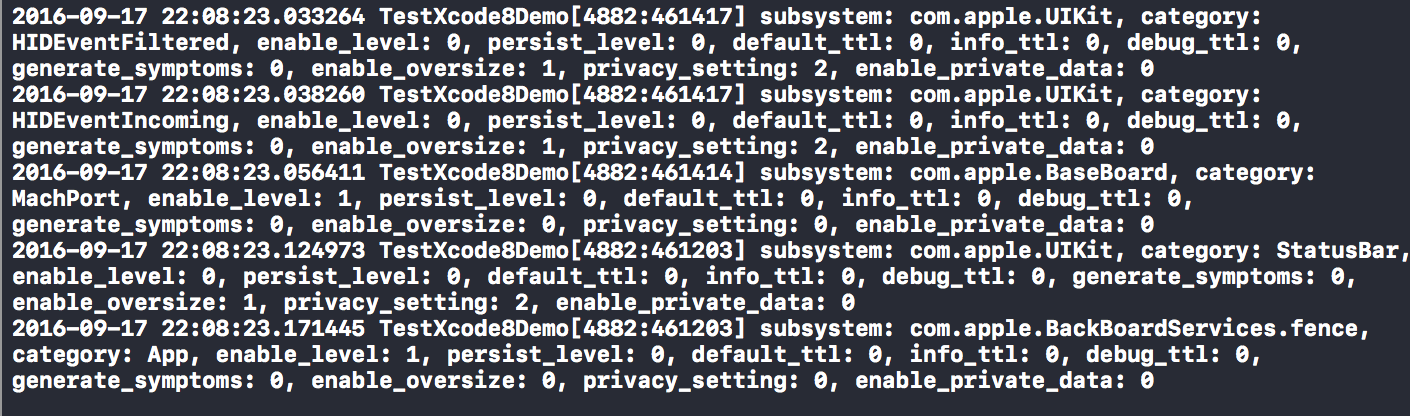
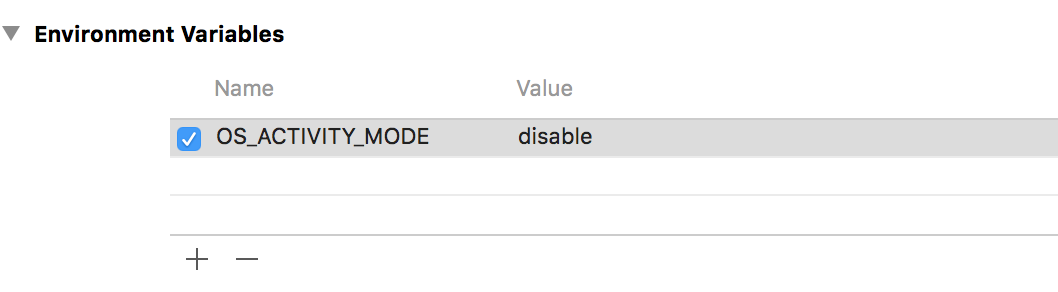
<h2 id="Xcode-8-运行一堆没用的logs解决办法"><a href="#Xcode-8-运行一堆没用的logs解决办法" class="headerlink" title="Xcode 8 运行一堆没用的logs解决办法"></a>Xcode 8 运行一堆没用的logs解决办法</h2><p><img src="http://test.ineutech.com/2016-09-17_xcode8_print_logs.png" alt="image"><br>上图我们看到，自己新建的一个工程什么也没做直接运行打印了一堆烂七八糟的东西，我觉得这个应该是Xcode 8的问题，打印的东西也没仔细研究，看着是一些项目的状态值，如果不想每次运行都有这些东西可以在Edite Scheme——&gt;Run——&gt;Arguments里设置OS_ACTIVITY_MODE : disable如下图</p>
<p><img src="http://test.ineutech.com/2016-09-17_lock_extra_logs.png" alt="image"></p>
<h2 id="iOS-10新特性"><a href="#iOS-10新特性" class="headerlink" title="iOS 10新特性"></a>iOS 10新特性</h2><ul>
<li>Xcode 8 是为iOS 10服务的，所以要了解iOS 10参看：<a href="https://developer.apple.com/library/content/releasenotes/General/WhatsNewIniOS/Articles/iOS10.html#//apple_ref/doc/uid/TP40017084-SW1" target="_blank" rel="external">iOS 10 苹果官方文档</a></li>
</ul>
]]></content>
    
    <summary type="html">
    
      &lt;h2 id=&quot;Xcode-8-0-版本&quot;&gt;&lt;a href=&quot;#Xcode-8-0-版本&quot; class=&quot;headerlink&quot; title=&quot;Xcode 8.0 版本&quot;&gt;&lt;/a&gt;Xcode 8.0 版本&lt;/h2&gt;&lt;ul&gt;
&lt;li&gt;Xcode 8.0GM版本已发布了一段时间，用于
    
    </summary>
    
    
      <category term="Xcode 8.0" scheme="http://thornvbear.tech/tags/Xcode-8-0/"/>
    
      <category term="新特性" scheme="http://thornvbear.tech/tags/%E6%96%B0%E7%89%B9%E6%80%A7/"/>
    
  </entry>
  
  <entry>
    <title>如何把View Controller瘦下来！</title>
    <link href="http://thornvbear.tech/2016/08/18/%E5%A6%82%E4%BD%95%E6%8A%8AViewController%E7%98%A6%E4%B8%8B%E6%9D%A5/"/>
    <id>http://thornvbear.tech/2016/08/18/如何把ViewController瘦下来/</id>
    <published>2016-08-18T14:49:38.000Z</published>
    <updated>2016-08-25T15:58:48.000Z</updated>
    
    <content type="html"><![CDATA[<h1 id="如何把View-Controller瘦下来"><a href="#如何把View-Controller瘦下来" class="headerlink" title="如何把View Controller瘦下来"></a>如何把View Controller瘦下来</h1><ul>
<li>有时候View Controller由于做了太多的事情，而变得非常庞大。这里既有数据的收集，又有逻辑的处理，还有各种归属于该View Controller的控件内存分配。这里面哪些可以代理到其他模块呢？这篇博客就是探索项目的架构，目的是分离复杂的代码逻辑，让我们的代码可读性更强。</li>
<li>在View Controller里，这些职责或许是被各种 <code>#pragma mark</code> 分组实现，如果你是这样的话，那么就可以考虑把这些部分拆分到不同的文件里。</li>
</ul>
<h1 id="Data-Source"><a href="#Data-Source" class="headerlink" title="Data Source"></a>Data Source</h1><ul>
<li>Data Source的方式是一种拆离View Controller里数据显示逻辑的方式，尤其是在一些复杂的table views里，这种方式可以有效地从View Controller里分离所有cells的数据显示逻辑。</li>
<li><p>Data Source对象可以遵守<code>UITableViewDataSource</code>协议，以实现数据的显示，但是我发现使用这些对象配置cells是一件可以独立出来的逻辑，所以可以把这部分逻辑也独立出来。下面一个很简单的例子：</p>
<pre><code>@implementation TBSectionedDataSource : NSObject

- (instancetype)initWithObjects:(NSArray *)objects sectioningKey:(NSString *)sectioningKey {
    self = [super init];
    if (!self) return nil;

    [self sectionObjects:objects withKey:sectioningKey];

    return self;
}

- (void)sectionObjects:(NSArray *)objects withKey:(NSString *)sectioningKey {
    self.sectionedObjects = objects //section the objects array
}

- (NSUInteger)numberOfSections {
    return self.sectionedObjects.count;
}

- (NSUInteger)numberOfObjectsInSection:(NSUInteger)section {
    return [self.sectionedObjects[section] count];
}

- (id)objectAtIndexPath:(NSIndexPath *)indexPath {
    return self.sectionedObjects[indexPath.section][indexPath.row];
}

@end
</code></pre></li>
<li><p>这种data source的设计是为了抽象和重用，不要担心你的类仅仅在一个地方使用。从view controller里分离数据显示逻辑是一种管理懒加载的方式。特别是针对一个动态table views来说，这种方式很适合view controller来管理显示数据。</p>
</li>
<li>这种方式也可以管理你的重用逻辑。在这里可以获取服务器端的数据，从而把网络访问模块给分离出去。</li>
<li>如果你的界面是静态的话，那么你可以定制一个data source类用来专门显示这一块。在多个data source的情况下，每一个data source的子类都可以在自己的section里显示。</li>
<li>使用这种方式可以避免很多事情，把数据逻辑拆分的同时还可以把网络访问模块拆出来。</li>
</ul>
<h1 id="Standard-Composition"><a href="#Standard-Composition" class="headerlink" title="Standard Composition"></a>Standard Composition</h1><ul>
<li>这个可以理解为标准化组合，多个View Controller可以使用View Controller容器管理起来，如果你的view controller由多个逻辑单元组成，那么可以把这种复杂的逻辑拆分到多个view controller中。经验表明这种方式适合一个界面有多个table view或者是多个collection view的情况。</li>
<li><p>比如在一个界面上包含一个header和一个网格类型的视图，那么我们可以使用懒加载的方式加载这两个view controller，当系统用到的时候再去加载资源。</p>
<pre><code>- (TBHeaderViewController *)headerViewController {
    if (!_headerViewController) {
        TBHeaderViewController *headerViewController = [[TBHeaderViewController alloc] init];
          [self addChildViewController:headerViewController];
        [headerViewController didMoveToParentViewController:self];

        [self.view addSubview:headerViewController.view];

        self.headerViewController = headerViewController;
        }
        return _headerViewController;
}

- (TBGridViewController *)gridViewController {
    if (!_gridViewController) {
           TBGridViewController *gridViewController = [[TBGridViewController alloc] init];

        [self addChildViewController:gridViewController];
        [gridViewController didMoveToParentViewController:self];

        [self.view addSubview:gridViewController.view];

        self.gridViewController = gridViewController;
    }
    return _gridViewController;
}

- (void)viewDidLayoutSubviews {
    [super viewDidLayoutSubviews];

    CGRect workingRect = self.view.bounds;

    CGRect headerRect = CGRectZero, gridRect = CGRectZero;
    CGRectDivide(workingRect, &amp;headerRect, &amp;gridRect, 44, CGRectMinYEdge);

    self.headerViewController.view.frame = tagHeaderRect;
    self.gridViewController.view.frame = hotSongsGridRect;
}
</code></pre></li>
<li><p>在结果子视图里，其包含的每个collection view，都展示统一的数据类型，这样更便于管理和修改。</p>
<h1 id="Smarter-Views"><a href="#Smarter-Views" class="headerlink" title="Smarter Views"></a>Smarter Views</h1></li>
<li><p>如果你是在view controller类初始化你所有的子视图的话，那么你应该考虑使用更适合自己的View。UIViewController默认使用UIView，不过同样你可以自定义View实现重写。使用<code>-loadView</code>来达到这种效果，在这里你只需要把自定义的View设置给<code>self.view</code>即可。</p>
<pre><code>@implementation TBProfileViewController

- (void)loadView {
    self.view = [[TBProfileView alloc] init];
}

//...

@end

@implementation TBProfileView : NSObject

- (UILabel *)nameLabel {
    if (!_nameLabel) {
        UILabel *nameLabel = [[UILabel alloc] init];
        //configure font, color, etc
        [self addSubview:nameLabel];
            self.nameLabel = nameLabel;
    }
    return _nameLabel;
}

- (UIImageView *)avatarImageView {
    if (!_avatarImageView) {
        UIImageView * avatarImageView = [UIImageView new];
        [self addSubview:avatarImageView];
        self.avatarImageView = avatarImageView;
    }
    return _avatarImageView
}

- (void)layoutSubviews {
    //perform layout
}

@end
</code></pre><h1 id="Presenter"><a href="#Presenter" class="headerlink" title="Presenter"></a>Presenter</h1></li>
<li>Presenter（一系列get方法）是从Model中获取数据并提供给View层，Presenter还负责处理后台任务</li>
<li>主导器一般包含着model对象，这里的model是用来展示的，所以属性都是暴露出来的。</li>
</ul>
<figure class="highlight plain"><table><tr><td class="gutter"><pre><div class="line">1</div><div class="line">2</div><div class="line">3</div><div class="line">4</div><div class="line">5</div><div class="line">6</div><div class="line">7</div><div class="line">8</div><div class="line">9</div><div class="line">10</div><div class="line">11</div><div class="line">12</div><div class="line">13</div><div class="line">14</div><div class="line">15</div><div class="line">16</div><div class="line">17</div><div class="line">18</div><div class="line">19</div><div class="line">20</div><div class="line">21</div><div class="line">22</div><div class="line">23</div><div class="line">24</div><div class="line">25</div><div class="line">26</div><div class="line">27</div><div class="line">28</div><div class="line">29</div><div class="line">30</div><div class="line">31</div><div class="line">32</div><div class="line">33</div><div class="line">34</div><div class="line">35</div><div class="line">36</div><div class="line">37</div><div class="line">38</div></pre></td><td class="code"><pre><div class="line"></div><div class="line">@implementation TBUserPresenter : NSObject</div><div class="line"></div><div class="line">- (instancetype)initWithUser:(TBUser *)user &#123;</div><div class="line">    self = [super init];</div><div class="line">    if (!self) return nil;</div><div class="line">    _user = user;</div><div class="line">    return self;</div><div class="line">&#125;</div><div class="line"></div><div class="line">- (NSString *)name &#123;</div><div class="line">    return self.user.name;</div><div class="line">&#125;</div><div class="line"></div><div class="line">- (NSString *)followerCountString &#123;</div><div class="line">    if (self.user.followerCount == 0) &#123;</div><div class="line">        return @&quot;&quot;;</div><div class="line">    &#125;</div><div class="line">    return [NSString stringWithFormat:@&quot;%@ followers&quot;, [NSNumberFormatter localizedStringFromNumber:@(_user.followerCount) numberStyle:NSNumberFormatterDecimalStyle]];</div><div class="line">&#125;</div><div class="line"></div><div class="line">- (NSString *)followersString &#123;</div><div class="line">    NSMutableString *followersString = [@&quot;Followed by &quot; mutableCopy];</div><div class="line">    [followersString appendString:[self.class.arrayFormatter stringFromArray:[self.user.topFollowers valueForKey:@&quot;name&quot;]];</div><div class="line">    return followersString;</div><div class="line">&#125;</div><div class="line"></div><div class="line">+ (TTTArrayFormatter*) arrayFormatter &#123;</div><div class="line">    static TTTArrayFormatter *_arrayFormatter;</div><div class="line">    static dispatch_once_t onceToken;</div><div class="line">    dispatch_once(&amp;onceToken, ^&#123;</div><div class="line">        _arrayFormatter = [[TTTArrayFormatter alloc] init];</div><div class="line">        _arrayFormatter.usesAbbreviatedConjunction = YES;</div><div class="line">    &#125;);</div><div class="line">    return _arrayFormatter;</div><div class="line">&#125;</div><div class="line"></div><div class="line">@end</div></pre></td></tr></table></figure>
<ul>
<li>需要注意的一点是，model对象本身是不暴露出去的。Presenter作为model的看门人，保证了view controller不用避开主逻辑服务，而可以直接访问model层。这种架构减少了依赖性，由于 <code>TBUser</code> 的存在，使得model接触的类比较少，因此如果它改变，则牵涉的逻辑比较少。</li>
</ul>
<h1 id="Binding-pattern"><a href="#Binding-pattern" class="headerlink" title="Binding pattern"></a>Binding pattern</h1><ul>
<li>在形式上，这种可以看做<code>-configureView</code>。当数据层发生改变的时候捆绑形式就会更新view。Cocoa本身就适合这个，因为KVO可以检测到model层的变动，而KVC可以从model层读取数据然后赋给view，两者实现完美结合。第三方库Reactive Cocoa也是采用了这种方式，但它有点太庞大。</li>
<li>这种方式与主导器结合起来效果非常好，一个创建对象来传递值，而另一个去接受然后显示到view上。</li>
</ul>
<figure class="highlight plain"><table><tr><td class="gutter"><pre><div class="line">1</div><div class="line">2</div><div class="line">3</div><div class="line">4</div><div class="line">5</div><div class="line">6</div><div class="line">7</div><div class="line">8</div><div class="line">9</div><div class="line">10</div><div class="line">11</div><div class="line">12</div><div class="line">13</div><div class="line">14</div><div class="line">15</div><div class="line">16</div><div class="line">17</div><div class="line">18</div><div class="line">19</div><div class="line">20</div><div class="line">21</div><div class="line">22</div><div class="line">23</div><div class="line">24</div><div class="line">25</div></pre></td><td class="code"><pre><div class="line">@implementation TBProfileBinding : NSObject</div><div class="line"></div><div class="line">- (instancetype)initWithView:(TBProfileView *)view presenter:(TBUserPresenter *)presenter &#123;</div><div class="line">    self = [super init];</div><div class="line">    if (!self) return nil;</div><div class="line">    _view = view;</div><div class="line">    _presenter = presenter;</div><div class="line">    return self;</div><div class="line">&#125;</div><div class="line"></div><div class="line">- (NSDictionary *)bindings &#123;</div><div class="line">    return @&#123;</div><div class="line">              @&quot;name&quot;: @&quot;nameLabel.text&quot;,</div><div class="line">              @&quot;followerCountString&quot;: @&quot;followerCountLabel.text&quot;,</div><div class="line">            &#125;;</div><div class="line">&#125;</div><div class="line"></div><div class="line">- (void)updateView &#123;</div><div class="line">    [self.bindings enumerateKeysAndObjectsUsingBlock:^(id presenterKeyPath, id viewKeyPath, BOOL *stop) &#123;</div><div class="line">        id newValue = [self.presenter valueForKeyPath:presenterKeyPath];</div><div class="line">        [self.view setObject:newvalue forKeyPath:viewKeyPath];</div><div class="line">    &#125;];</div><div class="line">&#125;</div><div class="line"></div><div class="line">@end</div></pre></td></tr></table></figure>
<h1 id="interaction-pattern"><a href="#interaction-pattern" class="headerlink" title="interaction pattern"></a>interaction pattern</h1><ul>
<li>有时候View Controller过于庞大会带来很多你意想不到的问题。View Controller的角色是接受用户操作然后更新views和相应的model。如今的交互变得越来越复杂化，并且还造成了很大的代码冗余。</li>
<li>交互常包括很多控件初始化，可选择性的信息输入，和一些事件，比如网络访问和状态改变。其实这种操作的生命周期是可以集成到交互对象里的。下面的例子就是讲button被按下时候的交互事件，但是把交互对象作为action的target，比如：<code>[button addTarget:self.followUserInteraction action:@selector(follow)]</code>也是很不错的。</li>
</ul>
<figure class="highlight plain"><table><tr><td class="gutter"><pre><div class="line">1</div><div class="line">2</div><div class="line">3</div><div class="line">4</div><div class="line">5</div><div class="line">6</div><div class="line">7</div><div class="line">8</div><div class="line">9</div><div class="line">10</div><div class="line">11</div><div class="line">12</div><div class="line">13</div><div class="line">14</div><div class="line">15</div><div class="line">16</div><div class="line">17</div><div class="line">18</div><div class="line">19</div><div class="line">20</div><div class="line">21</div><div class="line">22</div><div class="line">23</div><div class="line">24</div><div class="line">25</div><div class="line">26</div><div class="line">27</div><div class="line">28</div><div class="line">29</div><div class="line">30</div><div class="line">31</div><div class="line">32</div><div class="line">33</div><div class="line">34</div><div class="line">35</div><div class="line">36</div><div class="line">37</div><div class="line">38</div><div class="line">39</div><div class="line">40</div></pre></td><td class="code"><pre><div class="line">@implementation TBProfileViewController</div><div class="line"></div><div class="line">- (void)followButtonTapped:(id)sender &#123;</div><div class="line">    self.followUserInteraction = [[TBFollowUserInteraction alloc] initWithUserToFollow:self.user delegate:self];</div><div class="line">    [self.followUserInteraction follow];</div><div class="line">&#125;</div><div class="line"></div><div class="line">- (void)interactionCompleted:(TBFollowUserInteraction *)interaction &#123;</div><div class="line">    [self.binding updateView];</div><div class="line">&#125;</div><div class="line"></div><div class="line">//...</div><div class="line"></div><div class="line">@end</div><div class="line"></div><div class="line">@implementation TBFollowUserInteraction : NSObject &lt;UIAlertViewDelegate&gt;</div><div class="line"></div><div class="line">- (instancetype)initWithUserToFollow:user delegate:(id&lt;InteractionDelegate&gt;)delegate &#123;</div><div class="line">    self = [super init];</div><div class="line">    if !(self) return nil;</div><div class="line">    _user = user;</div><div class="line">    _delegate = delegate;</div><div class="line">    return self;</div><div class="line">&#125;</div><div class="line"></div><div class="line">- (void)follow &#123;</div><div class="line">    [[[UIAlertView alloc] initWithTitle:nil</div><div class="line">                                message:@&quot;Are you sure you want to follow this user?&quot;</div><div class="line">                               delegate:self</div><div class="line">                      cancelButtonTitle:@&quot;Cancel&quot;</div><div class="line">                      otherButtonTitles:@&quot;Follow&quot;, nil] show];</div><div class="line">&#125;</div><div class="line"></div><div class="line">- (void)alertView:(UIAlertView *)alertView clickedButtonAtIndex:(NSInteger)buttonIndex &#123;</div><div class="line">    if  ([alertView buttonTitleAtIndex:buttonIndex] isEqual:@&quot;Follow&quot;]) &#123;</div><div class="line">        [self.user.APIGateway followWithCompletionBlock:^&#123;</div><div class="line">            [self.delegate interactionCompleted:self];</div><div class="line">        &#125;];</div><div class="line">    &#125;</div><div class="line">&#125;</div></pre></td></tr></table></figure>
<h1 id="键盘管理"><a href="#键盘管理" class="headerlink" title="键盘管理"></a>键盘管理</h1><ul>
<li>在键盘状态改变后更新视图也是一个需要考虑的点，之前有可能是放在了view controller里，但是这个功能可以很容易被移植到键盘管理对象里。当然有很多键盘管理的例子，然而，如果你觉得他们过于繁杂，可以尝试简单的版本：</li>
</ul>
<figure class="highlight plain"><table><tr><td class="gutter"><pre><div class="line">1</div><div class="line">2</div><div class="line">3</div><div class="line">4</div><div class="line">5</div><div class="line">6</div><div class="line">7</div><div class="line">8</div><div class="line">9</div><div class="line">10</div><div class="line">11</div><div class="line">12</div><div class="line">13</div><div class="line">14</div><div class="line">15</div><div class="line">16</div><div class="line">17</div><div class="line">18</div><div class="line">19</div><div class="line">20</div><div class="line">21</div><div class="line">22</div><div class="line">23</div><div class="line">24</div><div class="line">25</div><div class="line">26</div><div class="line">27</div><div class="line">28</div><div class="line">29</div><div class="line">30</div><div class="line">31</div><div class="line">32</div><div class="line">33</div><div class="line">34</div></pre></td><td class="code"><pre><div class="line">@implementation TBNewPostKeyboardManager : NSObject</div><div class="line"></div><div class="line">- (instancetype)initWithTableView:(UITableView *)tableView &#123;</div><div class="line">    self = [super init];</div><div class="line">    if (!self) return nil;</div><div class="line">    _tableView = tableView;</div><div class="line">    return self;</div><div class="line">&#125;</div><div class="line"></div><div class="line">- (void)beginObservingKeyboard &#123;</div><div class="line">    [[NSNotificationCenter defaultCenter] addObserver:self selector:@selector(keyboardDidHide:) name:UIKeyboardDidHideNotification object:nil];</div><div class="line">    [[NSNotificationCenter defaultCenter] addObserver:self selector:@selector(keyboardWillShow:) name:UIKeyboardWillShowNotification object:nil];</div><div class="line">&#125;</div><div class="line"></div><div class="line">- (void)endObservingKeyboard &#123;</div><div class="line">    [[NSNotificationCenter defaultCenter] removeObserver:self name:UIKeyboardDidHideNotification object:nil];</div><div class="line">    [[NSNotificationCenter defaultCenter] removeObserver:self name:UIKeyboardWillShowNotification object:nil];</div><div class="line">&#125;</div><div class="line"></div><div class="line">- (void)keyboardWillShow:(NSNotification *)note &#123;</div><div class="line">    CGRect keyboardRect = [[note.userInfo objectForKey:UIKeyboardFrameEndUserInfoKey] CGRectValue];</div><div class="line"></div><div class="line">    UIEdgeInsets contentInsets = UIEdgeInsetsMake(self.tableView.contentInset.top, 0.0f, CGRectGetHeight(keyboardRect), 0.0f);</div><div class="line">    self.tableView.contentInset = contentInsets;</div><div class="line">    self.tableView.scrollIndicatorInsets = contentInsets;</div><div class="line">&#125;</div><div class="line"></div><div class="line">- (void)keyboardDidHide:(NSNotification *)note &#123;</div><div class="line">    UIEdgeInsets contentInset = UIEdgeInsetsMake(self.tableView.contentInset.top, 0.0f, self.oldBottomContentInset, 0.0f);</div><div class="line">    self.tableView.contentInset = contentInset;</div><div class="line">    self.tableView.scrollIndicatorInsets = contentInset;</div><div class="line">&#125;</div><div class="line"></div><div class="line">@end</div></pre></td></tr></table></figure>
<ul>
<li>你可以调用<code>-beginObservingKeyboard</code>和<code>-endObservingKeyboard</code>，从开始<code>-viewDidAppear</code>到结束<code>-viewWillDisappear</code>或者其他适合的地方。</li>
</ul>
<h1 id="导航栏"><a href="#导航栏" class="headerlink" title="导航栏"></a>导航栏</h1><ul>
<li>界面之间的转场正常情况下是通过<code>-pushViewController:animated:</code>。如果转场变得复杂了，那么可以考虑把这种操作代理到导航栏对象中，尤其在适用于iPhone/iPad通用的app，导航需要改变依赖于栈中的最顶端的size class。</li>
</ul>
<figure class="highlight plain"><table><tr><td class="gutter"><pre><div class="line">1</div><div class="line">2</div><div class="line">3</div><div class="line">4</div><div class="line">5</div><div class="line">6</div><div class="line">7</div><div class="line">8</div><div class="line">9</div><div class="line">10</div><div class="line">11</div><div class="line">12</div><div class="line">13</div><div class="line">14</div><div class="line">15</div><div class="line">16</div><div class="line">17</div><div class="line">18</div><div class="line">19</div><div class="line">20</div><div class="line">21</div><div class="line">22</div><div class="line">23</div><div class="line">24</div><div class="line">25</div><div class="line">26</div><div class="line">27</div><div class="line">28</div><div class="line">29</div><div class="line">30</div><div class="line">31</div><div class="line">32</div><div class="line">33</div><div class="line">34</div><div class="line">35</div></pre></td><td class="code"><pre><div class="line">@protocol TBUserNavigator &lt;NSObject&gt;</div><div class="line"></div><div class="line">- (void)navigateToFollowersForUser:(TBUser *)user;</div><div class="line"></div><div class="line">@end</div><div class="line"></div><div class="line">@implementation TBiPhoneUserNavigator : NSObject&lt;TBUserNavigator&gt;</div><div class="line"></div><div class="line">- (instancetype)initWithNavigationController:(UINavigationController *)navigationController &#123;</div><div class="line">    self = [super init];</div><div class="line">    if (!self) return nil;</div><div class="line">    _navigationController = navigationController;</div><div class="line">    return self;</div><div class="line">&#125;</div><div class="line"></div><div class="line">- (void)navigateToFollowersForUser:(TBUser *)user &#123;</div><div class="line">    TBFollowerListViewController *followerList = [[TBFollowerListViewController alloc] initWithUser:user];</div><div class="line">    [self.navigationController pushViewController:followerList animated:YES];</div><div class="line">&#125;</div><div class="line"></div><div class="line">@end</div><div class="line"></div><div class="line">@implementation TBiPadUserNavigator : NSObject&lt;TBUserNavigator&gt;</div><div class="line"></div><div class="line">- (instancetype)initWithUserViewController:(TBUserViewController *)userViewController &#123;</div><div class="line">    self = [super init];</div><div class="line">    if (!self) return nil;</div><div class="line">    _userViewController = userViewController;</div><div class="line">    return self;</div><div class="line">&#125;</div><div class="line"></div><div class="line">- (void)navigateToFollowersForUser:(TBUser *)user &#123;</div><div class="line">    TBFollowerListViewController *followerList = [[TBFollowerListViewController alloc] initWithUser:user];</div><div class="line">    self.userViewController.supplementalViewController = followerList;</div><div class="line">&#125;</div></pre></td></tr></table></figure>
<ul>
<li>这种方式凸显出了一大好处是，把大的对象拆成了很多小的模块。他们可能会被修改，重写或者是替换。相比那些复杂臃肿的view controller，你可以把导航栏设置为自定义的<code>Navigator</code>。</li>
</ul>
]]></content>
    
    <summary type="html">
    
      &lt;h1 id=&quot;如何把View-Controller瘦下来&quot;&gt;&lt;a href=&quot;#如何把View-Controller瘦下来&quot; class=&quot;headerlink&quot; title=&quot;如何把View Controller瘦下来&quot;&gt;&lt;/a&gt;如何把View Controller瘦下来&lt;/
    
    </summary>
    
    
      <category term="UIView Controller" scheme="http://thornvbear.tech/tags/UIView-Controller/"/>
    
      <category term="拆分" scheme="http://thornvbear.tech/tags/%E6%8B%86%E5%88%86/"/>
    
  </entry>
  
  <entry>
    <title>PHP 笔记整理（一）</title>
    <link href="http://thornvbear.tech/2016/07/31/PHP%20%E7%AC%94%E8%AE%B0%E6%95%B4%E7%90%86%EF%BC%88%E4%B8%80%EF%BC%89/"/>
    <id>http://thornvbear.tech/2016/07/31/PHP 笔记整理（一）/</id>
    <published>2016-07-31T12:24:01.000Z</published>
    <updated>2016-11-16T05:22:37.000Z</updated>
    
    <content type="html"><![CDATA[<h3 id="PHP-变量规则"><a href="#PHP-变量规则" class="headerlink" title="PHP 变量规则"></a>PHP 变量规则</h3><ul>
<li>变量以 $ 符号开头，其后是变量的名称</li>
<li>变量名称必须以字母或下划线开头</li>
<li>变量名称不能以数字开头</li>
<li>变量名称只能包含字母数字字符和下划线（A-z、0-9 以及 _）</li>
<li>变量名称对大小写敏感（$y 与 $Y 是两个不同的变量）</li>
</ul>
<p>注释：PHP 变量名称对大小写敏感！</p>
<h3 id="PHP-是一门类型松散的语言"><a href="#PHP-是一门类型松散的语言" class="headerlink" title="PHP 是一门类型松散的语言"></a>PHP 是一门类型松散的语言</h3><ul>
<li>我们不必告知 PHP 变量的数据类型</li>
</ul>
<h3 id="PHP变量作用域"><a href="#PHP变量作用域" class="headerlink" title="PHP变量作用域"></a>PHP变量作用域</h3><h4 id="Local-和-Global-作用域"><a href="#Local-和-Global-作用域" class="headerlink" title="Local 和 Global 作用域"></a>Local 和 Global 作用域</h4><ul>
<li><p>函数之外声明的变量拥有 Global 作用域，只能在函数以外进行访问。</p>
</li>
<li><p>函数内部声明的变量拥有 LOCAL 作用域，只能在函数内部进行访问。</p>
</li>
</ul>
<h4 id="PHP-global-关键词"><a href="#PHP-global-关键词" class="headerlink" title="PHP global 关键词"></a>PHP global 关键词</h4><p><code>global</code>关键词用于访问函数内的全局变量。</p>
<p>要做到这一点，请在（函数内部）变量前面使用 global 关键词：</p>
<figure class="highlight plain"><table><tr><td class="gutter"><pre><div class="line">1</div><div class="line">2</div><div class="line">3</div><div class="line">4</div><div class="line">5</div><div class="line">6</div><div class="line">7</div><div class="line">8</div><div class="line">9</div><div class="line">10</div><div class="line">11</div><div class="line">12</div><div class="line">13</div></pre></td><td class="code"><pre><div class="line">实例</div><div class="line">&lt;?php</div><div class="line">$x=5;</div><div class="line">$y=10;</div><div class="line"></div><div class="line">function myTest() &#123;</div><div class="line">  global $x,$y;</div><div class="line">  $y=$x+$y;</div><div class="line">&#125;</div><div class="line"></div><div class="line">myTest();</div><div class="line">echo $y; // 输出 15</div><div class="line">?&gt;</div></pre></td></tr></table></figure>
<h4 id="var-dump-会返回变量的数据类型和值"><a href="#var-dump-会返回变量的数据类型和值" class="headerlink" title="var_dump() 会返回变量的数据类型和值"></a>var_dump() 会返回变量的数据类型和值</h4><h3 id="设置-PHP-常量"><a href="#设置-PHP-常量" class="headerlink" title="设置 PHP 常量"></a>设置 PHP 常量</h3><p>如需设置常量，请使用<code>define()</code>函数 - 它使用三个参数：</p>
<ul>
<li>首个参数定义常量的名称</li>
<li>第二个参数定义常量的值</li>
<li>可选的第三个参数规定常量名是否对大小写敏感。默认是 false。</li>
</ul>
<p>下例创建了一个对大小写敏感的常量，值为 “Welcome to W3School.com.cn!”：<br>实例</p>
<figure class="highlight plain"><table><tr><td class="gutter"><pre><div class="line">1</div><div class="line">2</div><div class="line">3</div><div class="line">4</div></pre></td><td class="code"><pre><div class="line">&lt;?php</div><div class="line">define(&quot;GREETING&quot;, &quot;Welcome to thornvbear.tech!&quot;);</div><div class="line">echo GREETING;</div><div class="line">?&gt;</div></pre></td></tr></table></figure>
<h4 id="字符串里单引号和双引号的区别"><a href="#字符串里单引号和双引号的区别" class="headerlink" title="字符串里单引号和双引号的区别"></a>字符串里单引号和双引号的区别</h4><ul>
<li>双引号解析变量，单引号不解析变量</li>
<li>单引号执行速率更快</li>
<li>双引号解析所有的转义符，单引号只解析`和\这两种转义符</li>
</ul>
<h4 id="数据类型转换"><a href="#数据类型转换" class="headerlink" title="数据类型转换"></a>数据类型转换</h4><ul>
<li>$str = 1 + ‘999abc’; 结果为10000；</li>
</ul>
<h4 id="字符串运算符"><a href="#字符串运算符" class="headerlink" title="字符串运算符"></a>字符串运算符</h4><ul>
<li>.     串接     $txt1 = “Hello”;  $txt2 = $txt1 . “ world!”     现在 $txt2 包含 “Hello world!”</li>
<li>.=     串接赋值     $txt1 = “Hello”; $txt1 .= “ world!”     现在 $txt1 包含 “Hello world!”</li>
</ul>
<h4 id="foreach-循环"><a href="#foreach-循环" class="headerlink" title="foreach 循环"></a>foreach 循环</h4><p>foreach 循环只适用于数组，并用于遍历数组中的每个键/值对。<br>语法</p>
<figure class="highlight plain"><table><tr><td class="gutter"><pre><div class="line">1</div><div class="line">2</div><div class="line">3</div></pre></td><td class="code"><pre><div class="line">foreach ($array as $value) &#123;</div><div class="line">  code to be executed;</div><div class="line">&#125;</div></pre></td></tr></table></figure>
<p>每进行一次循环迭代，当前数组元素的值就会被赋值给 $value 变量，并且数组指针会逐一地移动，直到到达最后一个数组元素。</p>
<h4 id="PHP关联数组-即字典-map"><a href="#PHP关联数组-即字典-map" class="headerlink" title="PHP关联数组(即字典 map)"></a>PHP关联数组(即字典 map)</h4><p>关联数组是使用您分配给数组的指定键的数组。</p>
<p>有两种创建关联数组的方法：</p>
<figure class="highlight plain"><table><tr><td class="gutter"><pre><div class="line">1</div></pre></td><td class="code"><pre><div class="line">$age=array(&quot;Peter&quot;=&gt;&quot;35&quot;,&quot;Ben&quot;=&gt;&quot;37&quot;,&quot;Joe&quot;=&gt;&quot;43&quot;);</div></pre></td></tr></table></figure>
<p>或者：</p>
<figure class="highlight plain"><table><tr><td class="gutter"><pre><div class="line">1</div><div class="line">2</div><div class="line">3</div></pre></td><td class="code"><pre><div class="line">$age[&apos;Peter&apos;]=&quot;35&quot;;</div><div class="line">$age[&apos;Ben&apos;]=&quot;37&quot;;</div><div class="line">$age[&apos;Joe&apos;]=&quot;43&quot;;</div></pre></td></tr></table></figure>
<p>随后可以在脚本中使用指定键：<br>实例</p>
<figure class="highlight plain"><table><tr><td class="gutter"><pre><div class="line">1</div><div class="line">2</div><div class="line">3</div><div class="line">4</div></pre></td><td class="code"><pre><div class="line">&lt;?php</div><div class="line">$age=array(&quot;Bill&quot;=&gt;&quot;35&quot;,&quot;Steve&quot;=&gt;&quot;37&quot;,&quot;Peter&quot;=&gt;&quot;43&quot;);</div><div class="line">echo &quot;Peter is &quot; . $age[&apos;Peter&apos;] . &quot; years old.&quot;;</div><div class="line">?&gt;</div></pre></td></tr></table></figure>
<h4 id="表单元素"><a href="#表单元素" class="headerlink" title="表单元素"></a>表单元素</h4><p>什么是 <code>$_SERVER[&quot;PHP_SELF&quot;]</code>变量？</p>
<p><code>$_SERVER[&quot;PHP_SELF&quot;]</code> 是一种超全局变量，它返回当前执行脚本的文件名。</p>
<p>因此，<code>$_SERVER[&quot;PHP_SELF&quot;]</code>将表单数据发送到页面本身，而不是跳转到另一张页面。这样，用户就能够在表单页面获得错误提示信息。<br>什么是 <code>htmlspecialchars()</code> 函数？</p>
<p><code>htmlspecialchars()</code>函数把特殊字符转换为 HTML 实体。这意味着 &lt; 和 &gt; 之类的 HTML 字符会被替换为 &lt; 和 &gt; 。这样可防止攻击者通过在表单中注入 HTML 或 JavaScript 代码（跨站点脚本攻击）对代码进行利用。</p>
<h3 id="PHP中不同的PHP片段是可以互相使用的-也就是没有片段一说-只是跟jsp很像-哪里使用写哪里"><a href="#PHP中不同的PHP片段是可以互相使用的-也就是没有片段一说-只是跟jsp很像-哪里使用写哪里" class="headerlink" title="PHP中不同的PHP片段是可以互相使用的  也就是没有片段一说  只是跟jsp很像  哪里使用写哪里"></a>PHP中不同的PHP片段是可以互相使用的  也就是没有片段一说  只是跟jsp很像  哪里使用写哪里</h3><hr>
<h3 id="PHP-Date-函数"><a href="#PHP-Date-函数" class="headerlink" title="PHP Date() 函数"></a>PHP Date() 函数</h3><h4 id="获得简单的日期"><a href="#获得简单的日期" class="headerlink" title="获得简单的日期"></a>获得简单的日期</h4><figure class="highlight plain"><table><tr><td class="gutter"><pre><div class="line">1</div><div class="line">2</div><div class="line">3</div><div class="line">4</div><div class="line">5</div><div class="line">6</div></pre></td><td class="code"><pre><div class="line">语法</div><div class="line"></div><div class="line">date(format,timestamp)</div><div class="line"></div><div class="line">format 	必需。规定时间戳的格式。</div><div class="line">timestamp 	可选。规定时间戳。默认是当前时间和日期。</div></pre></td></tr></table></figure>
<p>date() 函数的格式参数是必需的，它们规定如何格式化日期或时间。</p>
<p>下面列出了一些常用于日期的字符：</p>
<pre><code>d - 表示月里的某天（01-31）
m - 表示月（01-12）
M - 月的英文大写
Y - 表示年（四位数）
1 - 表示周里的某天
</code></pre><p>其他字符，比如 “/“, “.” 或 “-“ 也可被插入字符中，以增加其他格式。</p>
<h4 id="自动版权年份"><a href="#自动版权年份" class="headerlink" title="自动版权年份"></a>自动版权年份</h4><pre><code>© 2010-&lt;?php echo date(&quot;Y&quot;)?&gt;
</code></pre><h4 id="获得简单的时间"><a href="#获得简单的时间" class="headerlink" title="获得简单的时间"></a>获得简单的时间</h4><p>下面是常用于时间的字符：</p>
<pre><code>h - 带有首位零的 12 小时小时格式
i - 带有首位零的分钟
s - 带有首位零的秒（00 -59）
a - 小写的午前和午后（am 或 pm）
</code></pre><h4 id="mktime-创建日期"><a href="#mktime-创建日期" class="headerlink" title="mktime() 创建日期"></a>mktime() 创建日期</h4><p>语法</p>
<pre><code>mktime(hour,minute,second,month,day,year)
</code></pre><p>strtotime() 用字符串来创建日期</p>
<pre><code>strtotime(time,now)

实例
&lt;?php
$d=strtotime(&quot;10:38pm April 15 2015&quot;);
echo &quot;创建日期是 &quot; . date(&quot;Y-m-d h:i:sa&quot;, $d);
?&gt;
</code></pre><h3 id="PHP-include-和-require-语句"><a href="#PHP-include-和-require-语句" class="headerlink" title="PHP include 和 require 语句"></a>PHP include 和 require 语句</h3><p>通过 include 或 require 语句，可以将 PHP 文件的内容插入另一个 PHP 文件（在服务器执行它之前）。</p>
<p>include 和 require 语句是相同的，除了错误处理方面：</p>
<pre><code>require 会生成致命错误（E_COMPILE_ERROR）并停止脚本
include 只生成警告（E_WARNING），并且脚本会继续
</code></pre><p>因此，如果您希望继续执行，并向用户输出结果，即使包含文件已丢失，那么请使用 include。否则，在框架、CMS 或者复杂的 PHP 应用程序编程中，请始终使用 require 向执行流引用关键文件。这有助于提高应用程序的安全性和完整性，在某个关键文件意外丢失的情况下。</p>
<p>语法</p>
<pre><code>include &apos;filename&apos;;
</code></pre><p>或</p>
<pre><code>require &apos;filename&apos;;    
</code></pre><h3 id="PHP-操作文件"><a href="#PHP-操作文件" class="headerlink" title="PHP 操作文件"></a>PHP 操作文件</h3><p>注意：请谨慎操作文件！</p>
<p>当您操作文件时必须非常小心。如果您操作失误，可能会造成非常严重的破坏。常见的错误是：</p>
<ul>
<li>编辑错误的文件</li>
<li>被垃圾数据填满硬盘</li>
<li>意外删除文件内容</li>
</ul>
<h4 id="readfile-函数"><a href="#readfile-函数" class="headerlink" title="readfile() 函数"></a>readfile() 函数</h4><p><code>readfile()</code>函数读取文件，并把它写入输出缓冲。</p>
<h4 id="Open-File-fopen"><a href="#Open-File-fopen" class="headerlink" title="Open File - fopen()"></a>Open File - fopen()</h4><p>打开文件的更好的方法是通过<code>fopen()</code>函数。此函数为您提供比<code>readfile()</code>函数更多的选项。</p>
<p><code>fopen()</code>的第一个参数包含被打开的文件名，第二个参数规定打开文件的模式。如果<code>fopen()</code>函数未能打开指定的文件，下面的例子会生成一段消息：<br>实例</p>
<pre><code>&lt;?php
$myfile = fopen(&quot;webdictionary.txt&quot;, &quot;r&quot;) or die(&quot;Unable to open file!&quot;);
echo fread($myfile,filesize(&quot;webdictionary.txt&quot;));
fclose($myfile);
?&gt;
</code></pre><h4 id="读取文件-fread"><a href="#读取文件-fread" class="headerlink" title="读取文件 - fread()"></a>读取文件 - fread()</h4><p><code>fread()</code>函数读取打开的文件。</p>
<p><code>fread()</code>的第一个参数包含待读取文件的文件名，第二个参数规定待读取的最大字节数。</p>
<h4 id="关闭文件-fclose"><a href="#关闭文件-fclose" class="headerlink" title="关闭文件 - fclose()"></a>关闭文件 - fclose()</h4><p><code>fclose()</code>函数用于关闭打开的文件。</p>
<h4 id="读取单行文件-fgets"><a href="#读取单行文件-fgets" class="headerlink" title="读取单行文件 - fgets()"></a>读取单行文件 - fgets()</h4><p><code>fgets()</code>函数用于从文件读取单行。</p>
<h4 id="检查-End-Of-File-feof"><a href="#检查-End-Of-File-feof" class="headerlink" title="检查 End-Of-File - feof()"></a>检查 End-Of-File - feof()</h4><p><code>feof()</code>函数检查是否已到达<code>&quot;end-of-file&quot; (EOF)</code>。</p>
<p><code>feof()</code>对于遍历未知长度的数据很有用。</p>
<p>下例逐行读取 “webdictionary.txt” 文件，直到<code>end-of-file</code>：</p>
<pre><code>实例

&lt;?php
$myfile = fopen(&quot;webdictionary.txt&quot;, &quot;r&quot;) or die(&quot;Unable to open file!&quot;);
// 输出单行直到 end-of-file
while(!feof($myfile)) {
  echo fgets($myfile) . &quot;&lt;br&gt;&quot;;
}
fclose($myfile);
?&gt;
</code></pre><h4 id="读取单字符-fgetc"><a href="#读取单字符-fgetc" class="headerlink" title="读取单字符 - fgetc()"></a>读取单字符 - fgetc()</h4><p><code>fgetc()</code>函数用于从文件中读取单个字符。</p>
<h4 id="创建文件-fopen"><a href="#创建文件-fopen" class="headerlink" title="创建文件 - fopen()"></a>创建文件 - fopen()</h4><p><code>fopen()</code>函数也用于创建文件。也许有点混乱，但是在 PHP 中，创建文件所用的函数与打开文件的相同。</p>
<p>如果您用 <code>fopen()</code>打开并不存在的文件，此函数会创建文件，假定文件被打开为写入（w）或增加（a）。</p>
<p>文件权限</p>
<p>如果您试图运行这段代码时发生错误，请检查您是否有向硬盘写入信息的 PHP 文件访问权限。</p>
<h4 id="写入文件-fwrite"><a href="#写入文件-fwrite" class="headerlink" title="写入文件 - fwrite()"></a>写入文件 - fwrite()</h4><p><code>fwrite()</code> 函数用于写入文件。</p>
<p><code>fwrite()</code> 的第一个参数包含要写入的文件的文件名，第二个参数是被写的字符串。</p>
<p>下面的例子把姓名写入名为 “newfile.txt” 的新文件中：</p>
<pre><code>实例

&lt;?php
$myfile = fopen(&quot;newfile.txt&quot;, &quot;w&quot;) or die(&quot;Unable to open file!&quot;);
$txt = &quot;Bill Gates\n&quot;;
fwrite($myfile, $txt);
$txt = &quot;Steve Jobs\n&quot;;
fwrite($myfile, $txt);
fclose($myfile);
?&gt;
</code></pre><h3 id="什么是-Cookie？"><a href="#什么是-Cookie？" class="headerlink" title="什么是 Cookie？"></a>什么是 Cookie？</h3><p><code>cookie</code>常用于识别用户。</p>
<p><code>cookie</code> 是服务器留在用户计算机中的小文件。每当相同的计算机通过浏览器请求页面时，它同时会发送 <code>cookie</code>。通过 PHP，您能够创建并取回<code>cookie</code>的值。</p>
<h3 id="PHP-session"><a href="#PHP-session" class="headerlink" title="PHP session"></a>PHP session</h3><p>变量用于存储有关用户会话的信息，或更改用户会话的设置。<code>Session</code> 变量保存的信息是单一用户的，并且可供应用程序中的所有页面使用。</p>
<h4 id="Session-变量"><a href="#Session-变量" class="headerlink" title="Session 变量"></a>Session 变量</h4><p>当您运行一个应用程序时，您会打开它，做些更改，然后关闭它。这很像一次会话。计算机清楚你是谁。它知道你何时启动应用程序，并在何时终止。但是在因特网上，存在一个问题：服务器不知道你是谁以及你做什么，这是由于 HTTP 地址不能维持状态。</p>
<p>通过在服务器上存储用户信息以便随后使用，<code>PHP session</code>解决了这个问题（比如用户名称、购买商品等）。不过，会话信息是临时的，在用户离开网站后将被删除。如果您需要永久储存信息，可以把数据存储在数据库中。</p>
<p><code>Session</code> 的工作机制是：为每个访问者创建一个唯一的 id (UID)，并基于这个 UID 来存储变量。UID 存储在 <code>cookie</code> 中，亦或通过 URL 进行传导。</p>
<h4 id="session-start"><a href="#session-start" class="headerlink" title="session_start()"></a>session_start()</h4><p><code>session_start()</code>函数必须位于 <html> 标签之前：</html></p>
<pre><code>&lt;?php session_start(); ?&gt;

&lt;html&gt;
&lt;body&gt;

&lt;/body&gt;
&lt;/html&gt;
</code></pre><p>上面的代码会向服务器注册用户的会话，以便您可以开始保存用户信息，同时会为用户会话分配一个 UID。</p>
<h4 id="存储-Session-变量"><a href="#存储-Session-变量" class="headerlink" title="存储 Session 变量"></a>存储 Session 变量</h4><p>存储和取回 <code>session</code> 变量的正确方法是使用<code>PHP $_SESSION</code> 变量</p>
<h4 id="显示浏览用户数"><a href="#显示浏览用户数" class="headerlink" title="显示浏览用户数"></a>显示浏览用户数</h4><p><code>isset()</code>函数检测是否已设置<code>&quot;views&quot;</code>变量。如果已设置 <code>&quot;views&quot;</code>变量，我们累加计数器。如果 <code>&quot;views&quot;</code>不存在，则我们创建 <code>&quot;views&quot;</code>变量，并把它设置为 1：</p>
<pre><code>&lt;?php
session_start();

if(isset($_SESSION[&apos;views&apos;]))
  $_SESSION[&apos;views&apos;]=$_SESSION[&apos;views&apos;]+1;

else
  $_SESSION[&apos;views&apos;]=1;
echo &quot;Views=&quot;. $_SESSION[&apos;views&apos;];
?&gt;
</code></pre><h4 id="终结-Session"><a href="#终结-Session" class="headerlink" title="终结 Session"></a>终结 Session</h4><p>如果您希望删除某些 <code>session</code>数据，可以使用<code>unset()</code>或<code>session_destroy()</code>函数。</p>
<p><code>unset()</code> 函数用于释放指定的<code>session</code>变量：</p>
<pre><code>&lt;?php
unset($_SESSION[&apos;views&apos;]);
?&gt;

您也可以通过 session_destroy() 函数彻底终结 session：

&lt;?php
session_destroy();
?&gt;
</code></pre><h3 id="PHP-错误处理"><a href="#PHP-错误处理" class="headerlink" title="PHP 错误处理"></a>PHP 错误处理</h3><p>不同的错误处理方法：</p>
<ul>
<li>简单的 “die()” 语句</li>
<li>自定义错误和错误触发器</li>
<li>错误报告</li>
</ul>
<h4 id="die-函数"><a href="#die-函数" class="headerlink" title="die() 函数"></a>die() 函数</h4><p>第一个例子展示了一个打开文本文件的简单脚本：</p>
<pre><code>&lt;?php
$file=fopen(&quot;welcome.txt&quot;,&quot;r&quot;);
?&gt;
</code></pre><p>如果文件不存在，您会获得类似这样的错误：</p>
<pre><code>Warning: fopen(welcome.txt) [function.fopen]: failed to open stream: 
No such file or directory in C:\webfolder\test.php on line 2
</code></pre><p>为了避免用户获得类似上面的错误消息，我们在访问文件之前检测该文件是否存在：</p>
<pre><code>&lt;?php
if(!file_exists(&quot;welcome.txt&quot;))
 {
 die(&quot;File not found&quot;);
 }
else
 {
 $file=fopen(&quot;welcome.txt&quot;,&quot;r&quot;);
 }
?&gt;
</code></pre><p>现在，假如文件不存在，您会得到类似这样的错误消息：</p>
<pre><code>File not found
</code></pre><h3 id="异常处理"><a href="#异常处理" class="headerlink" title="异常处理"></a>异常处理</h3><p>异常（Exception）用于在指定的错误发生时改变脚本的正常流程。</p>
<h4 id="Try-throw-和-catch"><a href="#Try-throw-和-catch" class="headerlink" title="Try, throw 和 catch"></a>Try, throw 和 catch</h4><p>要避免上面例子出现的错误，我们需要创建适当的代码来处理异常。</p>
<p>正确的处理程序应当包括：</p>
<ul>
<li>Try - 使用异常的函数应该位于 “try” 代码块内。如果没有触发异常，则代码将照常继续执行。但是如果异常被触发，会抛出一个异常。</li>
<li>Throw - 这里规定如何触发异常。每一个 “throw” 必须对应至少一个 “catch”</li>
<li>Catch - “catch” 代码块会捕获异常，并创建一个包含异常信息的对象</li>
</ul>
<h4 id="设置顶层异常处理器-（Top-Level-Exception-Handler）"><a href="#设置顶层异常处理器-（Top-Level-Exception-Handler）" class="headerlink" title="设置顶层异常处理器 （Top Level Exception Handler）"></a>设置顶层异常处理器 （Top Level Exception Handler）</h4><p><code>set_exception_handler()</code>函数可设置处理所有未捕获异常的用户定义函数。</p>
<h3 id="PHP-过滤器（Filter）"><a href="#PHP-过滤器（Filter）" class="headerlink" title="PHP 过滤器（Filter）"></a>PHP 过滤器（Filter）</h3><p>PHP 过滤器用于验证和过滤来自非安全来源的数据，比如用户的输入。</p>
<p>什么是外部数据？</p>
<ul>
<li>来自表单的输入数据</li>
<li>Cookies</li>
<li>服务器变量</li>
<li>数据库查询结果</li>
</ul>
<h4 id="函数和过滤器"><a href="#函数和过滤器" class="headerlink" title="函数和过滤器"></a>函数和过滤器</h4><p>如需过滤变量，请使用下面的过滤器函数之一：</p>
<ul>
<li><code>filter_var()</code>- 通过一个指定的过滤器来过滤单一的变量</li>
<li><code>filter_var_array()</code> - 通过相同的或不同的过滤器来过滤多个变量</li>
<li><code>filter_input</code> - 获取一个输入变量，并对它进行过滤</li>
<li><code>filter_input_array</code> - 获取多个输入变量，并通过相同的或不同的过滤器对它们进行过滤</li>
</ul>
<p>在下面的例子中，我们用 <code>filter_var()</code> 函数验证了一个整数：</p>
<pre><code>&lt;?php
$int = 123;

if(!filter_var($int, FILTER_VALIDATE_INT))
 {
 echo(&quot;Integer is not valid&quot;);
 }
else
 {
 echo(&quot;Integer is valid&quot;);
 }
?&gt;
</code></pre><h4 id="Validating-和-Sanitizing"><a href="#Validating-和-Sanitizing" class="headerlink" title="Validating 和 Sanitizing"></a>Validating 和 Sanitizing</h4><p>有两种过滤器：</p>
<p><code>Validating</code> 过滤器：</p>
<ul>
<li>用于验证用户输入</li>
<li>严格的格式规则（比如 URL 或 E-Mail 验证）</li>
<li>如果成功则返回预期的类型，如果失败则返回 FALSE</li>
</ul>
<p><code>Sanitizing</code> 过滤器：</p>
<ul>
<li>用于允许或禁止字符串中指定的字符</li>
<li>无数据格式规则</li>
<li>始终返回字符串</li>
</ul>
<h3 id="Mysql数据库"><a href="#Mysql数据库" class="headerlink" title="Mysql数据库"></a>Mysql数据库</h3><h4 id="连接到一个-MySQL-数据库"><a href="#连接到一个-MySQL-数据库" class="headerlink" title="连接到一个 MySQL 数据库"></a>连接到一个 MySQL 数据库</h4><p>在您能够访问并处理数据库中的数据之前，您必须创建到达数据库的连接。</p>
<p>在 PHP 中，这个任务通过 <code>mysql_connect()</code>函数完成。<br>语法</p>
<pre><code>mysql_connect(servername,username,password);
</code></pre><h4 id="创建数据库"><a href="#创建数据库" class="headerlink" title="创建数据库"></a>创建数据库</h4><p><code>CREATE DATABASE</code> 语句用于在 <code>MySQL</code>中创建数据库。<br>语法</p>
<pre><code>CREATE DATABASE database_name
</code></pre><p>为了让 PHP 执行上面的语句，我们必须使用 <code>mysql_query()</code> 函数。</p>
<pre><code>&lt;?php
$con = mysql_connect(&quot;localhost&quot;,&quot;peter&quot;,&quot;abc123&quot;);
if (!$con)
  {
  die(&apos;Could not connect: &apos; . mysql_error());
  }

if (mysql_query(&quot;CREATE DATABASE my_db&quot;,$con))
  {
  echo &quot;Database created&quot;;
  }
else
  {
  echo &quot;Error creating database: &quot; . mysql_error();
  }

mysql_close($con);
?&gt;
</code></pre><h4 id="创建表"><a href="#创建表" class="headerlink" title="创建表"></a>创建表</h4><p><code>CREATE TABLE</code>用于在 <code>MySQL</code> 中创建数据库表</p>
<p>例子</p>
<p>下面的例子展示了如何创建一个名为<code>&quot;Persons&quot;</code>的表，此表有三列。列名是<code>&quot;FirstName&quot;</code>, <code>&quot;LastName&quot;</code>以及<code>&quot;Age&quot;</code>：</p>
<pre><code>&lt;?php
$con = mysql_connect(&quot;localhost&quot;,&quot;peter&quot;,&quot;abc123&quot;);
if (!$con)
  {
  die(&apos;Could not connect: &apos; . mysql_error());
  }

// Create database
if (mysql_query(&quot;CREATE DATABASE my_db&quot;,$con))
  {
  echo &quot;Database created&quot;;
  }
else
  {
  echo &quot;Error creating database: &quot; . mysql_error();
  }
// Create table in my_db database
mysql_select_db(&quot;my_db&quot;, $con);
$sql = &quot;CREATE TABLE Persons 
(
FirstName varchar(15),
LastName varchar(15),
Age int
)&quot;;
mysql_query($sql,$con);

mysql_close($con);
?&gt;
</code></pre><h4 id="向数据库表插入数据"><a href="#向数据库表插入数据" class="headerlink" title="向数据库表插入数据"></a>向数据库表插入数据</h4><p>INSERT INTO 语句用于向数据库表添加新记录。<br>语法</p>
<pre><code>INSERT INTO table_name
VALUES (value1, value2,....)
</code></pre><p>您还可以规定希望在其中插入数据的列：</p>
<pre><code>INSERT INTO table_name (column1, column2,...)
VALUES (value1, value2,....)
</code></pre><p>实例</p>
<pre><code>&lt;?php
$con = mysql_connect(&quot;localhost&quot;,&quot;peter&quot;,&quot;abc123&quot;);
if (!$con)
  {
  die(&apos;Could not connect: &apos; . mysql_error());
  }

mysql_select_db(&quot;my_db&quot;, $con);

mysql_query(&quot;INSERT INTO Persons (FirstName, LastName, Age) 
VALUES (&apos;Peter&apos;, &apos;Griffin&apos;, &apos;35&apos;)&quot;);

mysql_query(&quot;INSERT INTO Persons (FirstName, LastName, Age) 
VALUES (&apos;Glenn&apos;, &apos;Quagmire&apos;, &apos;33&apos;)&quot;);

mysql_close($con);
?&gt;
</code></pre><h3 id="函数"><a href="#函数" class="headerlink" title="函数"></a>函数</h3><p>mt_rand($min,$max) 随机数</p>
<p>解决页面乱码：header(content-type:text/html;)</p>
]]></content>
    
    <summary type="html">
    
      &lt;h3 id=&quot;PHP-变量规则&quot;&gt;&lt;a href=&quot;#PHP-变量规则&quot; class=&quot;headerlink&quot; title=&quot;PHP 变量规则&quot;&gt;&lt;/a&gt;PHP 变量规则&lt;/h3&gt;&lt;ul&gt;
&lt;li&gt;变量以 $ 符号开头，其后是变量的名称&lt;/li&gt;
&lt;li&gt;变量名称必须以字母或下
    
    </summary>
    
    
      <category term="php" scheme="http://thornvbear.tech/tags/php/"/>
    
  </entry>
  
  <entry>
    <title>博客搬家了！</title>
    <link href="http://thornvbear.tech/2016/07/28/%E6%96%B0%E5%8D%9A%E5%AE%A2%EF%BC%8C%E6%96%B0%E6%B0%94%E8%B1%A1/"/>
    <id>http://thornvbear.tech/2016/07/28/新博客，新气象/</id>
    <published>2016-07-28T09:39:13.000Z</published>
    <updated>2018-11-21T09:50:27.490Z</updated>
    
    <content type="html"><![CDATA[<h2 id="我的博客之路"><a href="#我的博客之路" class="headerlink" title="我的博客之路"></a>我的博客之路</h2><p><img align="center" src="http://test.ineutech.com/2016-07-30_blog_image.png"></p>
<h3 id="CSDN"><a href="#CSDN" class="headerlink" title="CSDN"></a>CSDN</h3><p>如今进入互联网这一行，如果没有自己的博客你都不好意思跟人家聊技术，我在3、4年就开始在CSDN上记录自己的学习过程，那时候之所以在CSDN上建博客，一来是因为方便，再者是没有技术要求。然而久而久之你会发现，这东西已经无法满足我们的要求，丫每次打开博客的时候都下决心要自定义自己的博客，于是乎就有了基于Octopress的博客。<br><a href="http://blog.csdn.net/u014783027" target="_blank" rel="external">CSDN博客</a></p>
<h3 id="Octopress"><a href="#Octopress" class="headerlink" title="Octopress"></a>Octopress</h3><p>那是去年的第一场雪，比前年来的稍晚一些；我在自己的mac上键入疾飞，在克服重重困难之后终于在<a href="https://github.com/" target="_blank" rel="external">github</a>上搭建了属于自己的博客。此博客用了一年之久，然而又久而久之，丫又满足不了我们的要求了。一是因为人懒了，好久没更新了，更重要是提交更新巨慢啊，<code>rake preview</code>之后，喝了一杯咖啡你会发现还有百分之十未完成。这是由于Octopress是基于Ruby的，生成博客文章的速度非常慢，于是我就查找到了代替它的东西<a href="https://hexo.io/" target="_blank" rel="external">Hexo</a>。</p>
<h3 id="Hexo"><a href="#Hexo" class="headerlink" title="Hexo"></a>Hexo</h3><p>使用Hexo的原因：</p>
<ul>
<li>Hexo和Octopress都是生成静态文件，可以很方便的托管到github和coding上</li>
<li>Hexo是基于Node的，而Node的速度是非常快的</li>
<li>Hexo目前在github上的stars已经超过Octopress，更多的人在维护Hexo</li>
</ul>
<p>配置Hexo的大致过程以及自己踩过的坑：</p>
<h4 id="安装Hexo"><a href="#安装Hexo" class="headerlink" title="安装Hexo"></a>安装Hexo</h4><p>要安装Hexo首先要安装<a href="https://www.npmjs.com/" target="_blank" rel="external">npm</a>:</p>
<p><strong>入坑1：</strong></p>
<p>当你安装npm的时候会提示你本地没有安装node,然后你去费劲周折安装node，回来再安装npm，觉得这次可以了吧。然后你会发现装不动啊，丫去查资料发现镜像是国外的，又是背墙的悲剧。换<a href="http://npm.taobao.org/" target="_blank" rel="external">淘宝镜像</a>,然后你终于发现在中国还是国产的好（当然核心还是国外的啊）！不过，最近发现NodeJs的安装包默认安装npm，这可方便了很多。</p>
<p>现在如下命令安装 Hexo：</p>
<pre><code>npm install -g hexo-cli
</code></pre><p>如果报用户权限不够就试试sudo，如果提示各种ERR的话就试试：</p>
<pre><code>npm install hexo --no-optional
</code></pre><p>实在不行，重新安装npm。</p>
<h4 id="创建一个新的博客"><a href="#创建一个新的博客" class="headerlink" title="创建一个新的博客"></a>创建一个新的博客</h4><p>接着我们创建一个新的博客目录：</p>
<pre><code>$ hexo init myBlogFolder #本地建文件夹
$ cd myBlogFolder
$ npm install
</code></pre><p>以上命令完成后，会在目标目录生成以下的目录结构：</p>
<pre><code>.
├── _config.yml
├── package.json
├── scaffolds
├── source
|   └── _posts
└── themes
</code></pre><p>之前的hexo会默认在source建很多文件夹，不过最近版的hexo只有一个_posts文件夹，其他需要自己创建。<br>可以看到，hexo的目录非常简单：</p>
<ul>
<li>_config.yml 是博客的配置文件，里面可以配置你的Title，签名，头像等等（ps:配置文件有Key: value的格式，并且冒号后必须有空格）</li>
<li>scaffolds 是博客文章模板。</li>
<li>source 是博客文章目录，你可以在这里添加标签、关于等文件夹便于管理。</li>
<li>themes 存放主题风格文件，默认是landscape，我个人使用的是<a href="https://github.com/iissnan/hexo-theme-next" target="_blank" rel="external">Next</a>。</li>
</ul>
<h4 id="OK！测试一下："><a href="#OK！测试一下：" class="headerlink" title="OK！测试一下："></a>OK！测试一下：</h4><p>生成博客配置文件</p>
<pre><code>hexo g
</code></pre><p>发布到本地服务器</p>
<pre><code>hexo s
</code></pre><p>访问：<code>localhost:4000</code><br>然后你会看到很朴素的博客就诞生了。</p>
<h4 id="发布到github和coding"><a href="#发布到github和coding" class="headerlink" title="发布到github和coding"></a>发布到github和coding</h4><p>根目录的_config.yml中找到：</p>
<pre><code>deploy:
    type: git
    repo:
    coding: https://git.coding.net/yourcoding/yourcoding.git,coding-pages
    github: https://github.com/yourgithub/yourgithub.github.io.git,master
</code></pre><p><strong>入坑2:</strong></p>
<p>在配置coding的时候，一定要放在coding-pages的分支，不要放在master，因为coding的pages功能默认在coding-pages分支上，当时我就是错设置为master，导致一直404；</p>
<p><strong>入坑3:</strong></p>
<p>在github建repository的时候，github默认每个用户只能建一个pages静态链接库，并且在创建repository时候加上<code>.github.io</code></p>
<h4 id="绑定域名"><a href="#绑定域名" class="headerlink" title="绑定域名"></a>绑定域名</h4><p>如果有需要可以购买属于自己的域名，设置解析域名，海外绑定github的地址，默认绑定coding的地址，这样就可以国内访问coding，国外访问github了。这里如何把github和coding绑定到自己的域名就不说了，网上有很多这方面的资料。</p>
<h2 id="Future"><a href="#Future" class="headerlink" title="Future"></a>Future</h2><p>记录学习与生活，希望自己在这一块净土，耕耘并记录自己的未来。</p>
]]></content>
    
    <summary type="html">
    
      &lt;h2 id=&quot;我的博客之路&quot;&gt;&lt;a href=&quot;#我的博客之路&quot; class=&quot;headerlink&quot; title=&quot;我的博客之路&quot;&gt;&lt;/a&gt;我的博客之路&lt;/h2&gt;&lt;p&gt;&lt;img align=&quot;center&quot; src=&quot;http://test.ineutech.com/2016
    
    </summary>
    
    
      <category term="hexo" scheme="http://thornvbear.tech/tags/hexo/"/>
    
      <category term="博客" scheme="http://thornvbear.tech/tags/%E5%8D%9A%E5%AE%A2/"/>
    
      <category term="github" scheme="http://thornvbear.tech/tags/github/"/>
    
      <category term="coding" scheme="http://thornvbear.tech/tags/coding/"/>
    
  </entry>
  
  <entry>
    <title>I&#39;m a test page</title>
    <link href="http://thornvbear.tech/2016/07/28/Test-page/"/>
    <id>http://thornvbear.tech/2016/07/28/Test-page/</id>
    <published>2016-07-28T09:39:13.000Z</published>
    <updated>2016-08-01T14:53:10.000Z</updated>
    
    <content type="html"><![CDATA[<p>Welcome to <a href="https://hexo.io/" target="_blank" rel="external">Hexo</a>! This is your very first post. Check <a href="https://hexo.io/docs/" target="_blank" rel="external">documentation</a> for more info. If you get any problems when using Hexo, you can find the answer in <a href="https://hexo.io/docs/troubleshooting.html" target="_blank" rel="external">troubleshooting</a> or you can ask me on <a href="https://github.com/hexojs/hexo/issues" target="_blank" rel="external">GitHub</a>.</p>
<h2 id="Quick-Start"><a href="#Quick-Start" class="headerlink" title="Quick Start"></a>Quick Start</h2><h3 id="Create-a-new-post"><a href="#Create-a-new-post" class="headerlink" title="Create a new post"></a>Create a new post</h3><figure class="highlight bash"><table><tr><td class="gutter"><pre><div class="line">1</div></pre></td><td class="code"><pre><div class="line">$ hexo new <span class="string">"My New Post"</span></div></pre></td></tr></table></figure>
<p>More info: <a href="https://hexo.io/docs/writing.html" target="_blank" rel="external">Writing</a></p>
<h3 id="Run-server"><a href="#Run-server" class="headerlink" title="Run server"></a>Run server</h3><figure class="highlight bash"><table><tr><td class="gutter"><pre><div class="line">1</div></pre></td><td class="code"><pre><div class="line">$ hexo server</div></pre></td></tr></table></figure>
<p>More info: <a href="https://hexo.io/docs/server.html" target="_blank" rel="external">Server</a></p>
<h3 id="Generate-static-files"><a href="#Generate-static-files" class="headerlink" title="Generate static files"></a>Generate static files</h3><figure class="highlight bash"><table><tr><td class="gutter"><pre><div class="line">1</div></pre></td><td class="code"><pre><div class="line">$ hexo generate</div></pre></td></tr></table></figure>
<p>More info: <a href="https://hexo.io/docs/generating.html" target="_blank" rel="external">Generating</a></p>
<h3 id="Deploy-to-remote-sites"><a href="#Deploy-to-remote-sites" class="headerlink" title="Deploy to remote sites"></a>Deploy to remote sites</h3><figure class="highlight bash"><table><tr><td class="gutter"><pre><div class="line">1</div></pre></td><td class="code"><pre><div class="line">$ hexo deploy</div></pre></td></tr></table></figure>
<p>More info: <a href="https://hexo.io/docs/deployment.html" target="_blank" rel="external">Deployment</a></p>
]]></content>
    
    <summary type="html">
    
      &lt;p&gt;Welcome to &lt;a href=&quot;https://hexo.io/&quot; target=&quot;_blank&quot; rel=&quot;external&quot;&gt;Hexo&lt;/a&gt;! This is your very first post. Check &lt;a href=&quot;https://hexo.
    
    </summary>
    
    
  </entry>
  
  <entry>
    <title>写在三周年</title>
    <link href="http://thornvbear.tech/2016/05/05/2016%E5%86%99%E5%9C%A8%E4%B8%89%E5%91%A8%E5%B9%B4/"/>
    <id>http://thornvbear.tech/2016/05/05/2016写在三周年/</id>
    <published>2016-05-05T02:10:10.000Z</published>
    <updated>2017-03-21T08:50:04.000Z</updated>
    
    <summary type="html">
    
    </summary>
    
    
      <category term="test" scheme="http://thornvbear.tech/tags/test/"/>
    
  </entry>
  
</feed>